
|
Do it yourself
| |||
| ||||


How to reset the service of the Renault Kadjar
Model: Renault Kadjar
MK 1
- Years 2015-2022
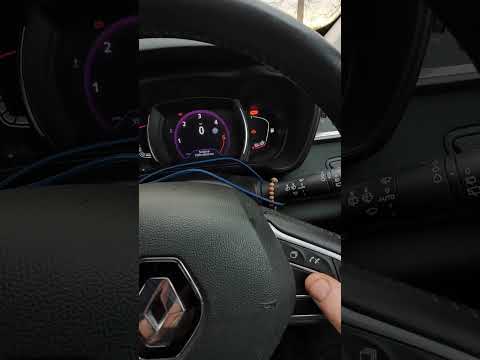
In this video we can see how to reset the service of the Renault Kadjar: turn on the ignition without starting the engine, scroll through the menu using the selection lever located on the control panel on the right side of the steering wheel, and positioned at the end of it. Select "maintenance interval": Press and hold the "ok" button - located on the same control panel, a little further to the right - for about five seconds, to confirm. The maintenance symbol will be displayed on the screen along with the service message. Press and hold the "ok" button for ten seconds. The display will now show the remaining distance to the next service. Release the "ok" button. Service reset.
Posted on 7 April 2024 by ScegliAuto
Video tutorial
Related tutorials
Renault Kadjar
(2015-2022 /
MK 1)
In today's video tutorial, you will see how to reset the service light on a Renault Kadjar in a few simple steps. Let's start the reset procedure by …
Renault Kadjar
(2015-2022 /
MK 1)
The procedure required to reset the service warning light on the dashboard of your Renault Kadjar is very simple and if you follow these instructions…

Renault Kadjar
(2015-2022 /
MK 1)
If you do not know how to correctly perform the manual reset of the service light on your Renault Kadjar, then all you have to do is follow the steps…
Other guides you may be interested in
|
Frequently Asked QuestionsHow to Replace the Oil Filter on a Ford Kuga
As the first step, release the bonnet and lift it to gain better access for the following operations. Now, proceed to remove the clips that secure the lower protective panel to the engine. You will need to move some parts indicated in the video to reach the position of the oil filter. Using a specific tool will make it easier to remove the top cover of the filter. Once the filter is replaced, simply retrace the steps described in reverse for reassembly. It is advisable to also replace the oil in your vehicle. by ScegliAuto More videos
|
|
For advertising on this site Write to info@scegliauto.com
ScegliAuto is not responsible for any inaccuracy of the data in the lists. To report any inaccuracy or your business (if you own the business in question), please write to info@scegliauto.com
Number of seconds to generate the page: 0.070
(c) ScegliAuto 2026 - info@scegliauto.com - Privacy policy VAT number: IT01247470535 |
