
|
Do it yourself
| |||
| ||||


How to Reset the Service Light on the Seat Leon 1P?
Model: Seat Leon
1P
- Years 2005-2013
The service light on the Seat Leon 1P, which belongs to the second phase of production, is reset using a specific button located on the dashboard. This is easy to find as you only need to look directly down at the centre of the dashboard: it is the only button there, so you can't miss it. Now, press and hold it while turning the key to start the ignition, wait a few seconds, then release the button and turn it to the right (clockwise), then switch off the ignition. This completes the reset of the service light.
Posted on 5 October 2026 by ScegliAuto
Video tutorial
Related tutorials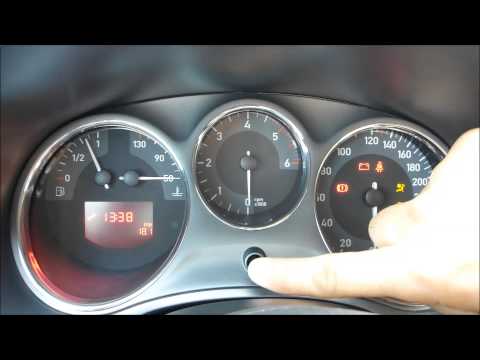
Seat Leon
(2005-2013 /
1P)
To reset the Service light on a Seat Leon, press and hold the button located in the centre of the instrument cluster. This allows you to insert the i…

Seat Leon
(2012-2019 /
MK 3, 5F)
To completely remove the Service warning light from the Seat Leon instrument panel, you will need to hold down the 0.0/SET button located in the cent…

Seat Leon
(2005-2013 /
1P)
To reset the service light on a 2009 Seat Leon, get into the vehicle, insert the key, and turn it to the ON position. This allows you to turn on the …
Other guides you may be interested in
|
How to Set the Clock on a Toyota Yaris Cross
To adjust the clock on the Toyota Yaris Cross, start the car, press the button with the right arrow to navigate through the different screens; keep pressing until you reach a list, then press the "OK" button on the "clock" option; use the up or down arrow to set the desired hour, then scroll right to set the minutes and use the up or down arrow to select the desired minutes. Once the correct time is set, press the "OK" button, go back, and return to the main screen. Finally, turn off the car. by ScegliAuto More videos
|
|
For advertising on this site Write to info@scegliauto.com
ScegliAuto is not responsible for any inaccuracy of the data in the lists. To report any inaccuracy or your business (if you own the business in question), please write to info@scegliauto.com
Number of seconds to generate the page: 0.173
(c) ScegliAuto 2026 - info@scegliauto.com - Privacy policy VAT number: IT01247470535 |
