
|
Do it yourself
| |||
| ||||


Subaru Impreza - Headlight bulbHeadlight Bulb Subaru Impreza (2016-2023 / mk 5) Subaru Impreza (2016-2023 / MK 5) How to Replace the Front Headlamp Bulb on a Subaru Impreza If you need to replace the front headlamp bulb on this model of car, follow the instructions provided in this description and refer to the images in the video. …Read all… Posted on 29 July 2026 by ScegliAuto  Subaru Impreza (2011-2016 / MK 4) Removing Headlight Bulbs from Subaru Impreza Do you want to replace the headlight bulbs or the headlight itself? Here’s how to disassemble everything on a Subaru Impreza. Lift the front bonnet by …Read all… Posted on 12 May 2026 by ScegliAuto  Subaru Impreza (2011-2016 / MK 4) Changing Front Headlight Bulbs on Subaru Impreza Let’s see how to replace the blown front headlight bulbs on the Subaru Impreza. Open the front bonnet by pulling the lever located at the bottom right of the …Read all… Posted on 7 April 2026 by ScegliAuto  Subaru Impreza (2011-2016 / MK 4) Replacing Front Headlight Bulbs on Subaru Impreza Are the front headlight bulbs on your Subaru blown? Here’s how to replace them. Open the front bonnet by pulling the lever located at the bottom right of the …Read all… Posted on 7 April 2026 by ScegliAuto  Subaru Impreza (2011-2016 / MK 4) Front Headlamp Bulb Replacement To access the bulbs of the left front headlamp, you must first remove the battery: ensure you have any necessary unlocking codes, such as for the radio, which …Read all… Posted on 21 February 2026 by ScegliAuto Headlight Bulb Subaru Impreza (2011-2016 / mk 4)
Subaru Impreza (2016-2023 / MK 5)How to Replace the Front Headlamp Bulb on a Subaru Impreza If you need to replace the front headlamp bulb on this model of car, follow the instructions provided in this description and refer to the images in the video. …Read all… Posted on 29 July 2026 by ScegliAuto
Subaru Impreza (2011-2016 / MK 4)Removing Headlight Bulbs from Subaru Impreza Do you want to replace the headlight bulbs or the headlight itself? Here’s how to disassemble everything on a Subaru Impreza. Lift the front bonnet by …Read all… Posted on 12 May 2026 by ScegliAuto
Subaru Impreza (2011-2016 / MK 4)Changing Front Headlight Bulbs on Subaru Impreza Let’s see how to replace the blown front headlight bulbs on the Subaru Impreza. Open the front bonnet by pulling the lever located at the bottom right of the …Read all… Posted on 7 April 2026 by ScegliAuto
Subaru Impreza (2011-2016 / MK 4)Replacing Front Headlight Bulbs on Subaru Impreza Are the front headlight bulbs on your Subaru blown? Here’s how to replace them. Open the front bonnet by pulling the lever located at the bottom right of the …Read all… Posted on 7 April 2026 by ScegliAuto
Subaru Impreza (2011-2016 / MK 4)Front Headlamp Bulb Replacement To access the bulbs of the left front headlamp, you must first remove the battery: ensure you have any necessary unlocking codes, such as for the radio, which …Read all… Posted on 21 February 2026 by ScegliAuto Cigarette lighter (1) Car stereo (1) Anti-roll bar (2) Battery (2) Control arm (1) Spark plugs (2) Body (1) Key (8) Timing belt (1) Checks and maintenance (3) CV boot (1) Differential (4) Brake rotors (1) Headlight (1) Air filter (5) Cabin air filter (6) Diesel fuel filter (1) Headlight bulb (5) Tail light bulb (1) Interior dome light bulb (1) Antifreeze coolant (1) Brake fluid (1) Engine oil (2) Door trim panel (2) Front bumper (2) Brake pads (4) Shift knob (1) Fuel pump (1) Car door (1) Fuse box (12) Side mirror (1) Rearview mirror (1) Warning light – error code (1) Tire pressure warning light (1) Service warning light (4) Windshield wipers (1) |
What does the "Code 82" message indicate in the Chevrolet Orlando and how to remove it?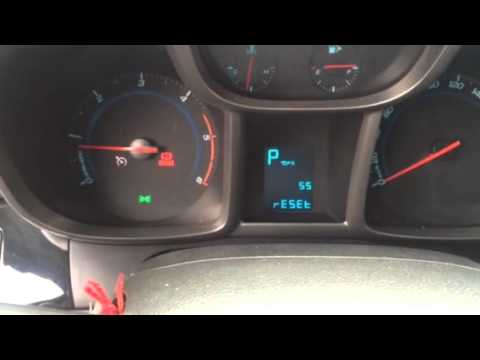
If the "Code 82" message appears on the dashboard of your Chevrolet Orlando, it means that the service interval in miles or time has been reached. Once all scheduled maintenance tasks are completed, you can remove the warning by following the simple procedure shown in this tutorial. First, insert the key and turn on the ignition, then press the "MENU" button located on the left control stalk and navigate to the screen displaying the "Reset" option. At this point, press the "SET/CLR" button at the end of the same stalk and confirm the reset. by ScegliAuto More videos
|
|
For advertising on this site Write to info@scegliauto.com
ScegliAuto is not responsible for any inaccuracy of the data in the lists. To report any inaccuracy or your business (if you own the business in question), please write to info@scegliauto.com
Number of seconds to generate the page: 0.009
(c) ScegliAuto 2026 - info@scegliauto.com - Privacy policy - About us VAT number: IT01247470535 |
