
|
Do it yourself
| |||
| ||||


Setting the time on the Suzuki Access 125
Model: Suzuki Access 125
Video tutorial
Finding ourselves in the need to set the exact time on the digital clock of the Suzuki Access 125, let's see how to proceed. We mount the saddle, turn on the instrument panel, press the black button to the right of the small display several times until the clock indication appears, wait a few seconds and press the button until the time indication starts flashing, release the button and then press it gently until the exact time appears. Press again for a long time until the minutes indication starts flashing, repeat the same procedure to also set the minutes.
Posted on 30 December 2024 by ScegliAuto
Related tutorials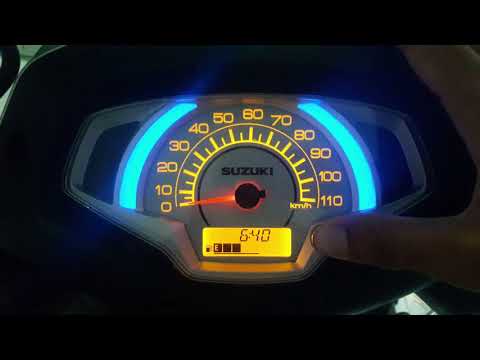
Access 125
This brief video guide shows the procedure to set the time on a Suzuki Access 125. Start by turning on the ignition without starting the engine, then…

Access 125
Today we will explain how to set the time on the display of the instrument panel of the Suzuki Access 125, and we will also explain how to reset the …

Access 125
In this tutorial, we can see how to adjust the time on the Suzuki Access 125 scooter, an extremely simple and quick operation to be carried out, for …
|
How to change the engine oil on the Aprilia Shiver 900?
To change the engine oil on the Aprilia Shiver 900, loosen the screws that secure the engine guard located at the bottom of the vehicle: once the screws are loosened, you can detach it and locate the drain plug of the oil sump. By removing this plug, you can collect all the used oil in a suitably placed container; at this point, allow all the oil to drain and remove the filter located at the bottom of the bike. Once the filter is replaced, top up the oil through the breather located on the right side of the bike. by ScegliAuto More videos
|
|
For advertising on this site Write to info@scegliauto.com
ScegliAuto is not responsible for any inaccuracy of the data in the lists. To report any inaccuracy or your business (if you own the business in question), please write to info@scegliauto.com
Number of seconds to generate the page: 0.007
(c) ScegliAuto 2026 - info@scegliauto.com - Privacy policy VAT number: IT01247470535 |
