
|
Do it yourself
| |||
| ||||


How to reset the service on the SYM NFX scooter?
Model: Sym Fnx
Video tutorial
In this tutorial we can see how to reset the service on the SYM NFX scooter, an extremely simple and quick operation, to be carried out only once all scheduled maintenance works have been completed. First of all, we insert the key, then we turn on the instrument panel and, using the "M" button located on the dashboard, we scroll through the various information until we reach the service interval. We then hold down the "S" button, keep it in position for the necessary time for the interval to reset correctly and complete the procedure by restarting the instrument panel.
Posted on 27 September 2025 by ScegliAuto
Related tutorials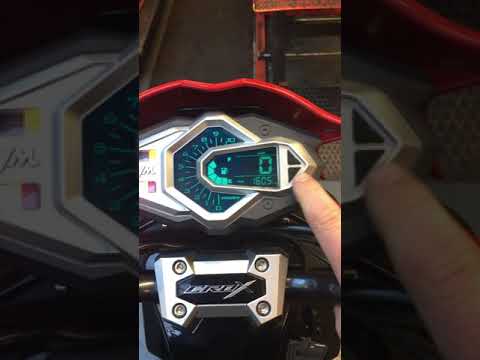
Crox 125
As seen in this brief tutorial, resetting the oil service on a SYM Crox 125 scooter is an extremely simple and quick operation. Before proceeding, en…

Joymax Z
In this tutorial, you will see how to reset the oil service on the SYM Joymax Z scooter, a very simple and quick operation to perform only after comp…

Sym Elite 50
Today we will explain how to reset the oil light on a Sym Elite 50 scooter. To perform the reset operation, turn on the instrument panel of our scoot…
ScegliAuto offers an extensive international collection of automotive tutorials available in 12 languages. Each guide combines instructional videos with original explanations written by experienced human editors, along with information about the car models covered.
|
How to Replace the Stator on the KTM XC 300
This guide will provide the main instructions on how to dismantle and replace the stator on the KTM XC 300 enduro bike. First, place the bike on a stand and begin by removing the stator cover, unscrewing the fastening screws located on the sides with a socket spanner; then disconnect the main connector of the stator, removing it along with the cover, as shown in the video. At this point, replace the stator with the new one of the correct type; refit the stator in the same position, then install the stator cover! by ScegliAuto More videos
|
|
For advertising on this site Write to info@scegliauto.com
ScegliAuto is not responsible for any inaccuracy of the data in the lists. To report any inaccuracy or your business (if you own the business in question), please write to info@scegliauto.com
Number of seconds to generate the page: 0.237
(c) ScegliAuto 2026 - info@scegliauto.com - Privacy policy - About us VAT number: IT01247470535 |
