
|
Do it yourself
| |||
| ||||


How to Replace the Drive Belt on the Sym VTS 200
Model: Sym Vts 200
Video tutorial
Follow the steps necessary to remove and replace the drive belt on the Sym VTS 200 scooter. First, place your scooter on the centre stand and start unscrewing all the fastening screws of the transmission cover to remove it; then unscrew the nut of the fan and the clutch bell to remove the components, as shown in the video. At this point, remove the drive belt and, if necessary, the variator, replacing it with new ones; apply the reverse procedure for reassembling the transmission!
Updated on 10 July 2026 by ScegliAuto
Related tutorials
Vts 200
To replace the belt on a Sym VTS 200, you need to loosen the screws that secure the cover located on the left side of the bike, near the rear wheel. …
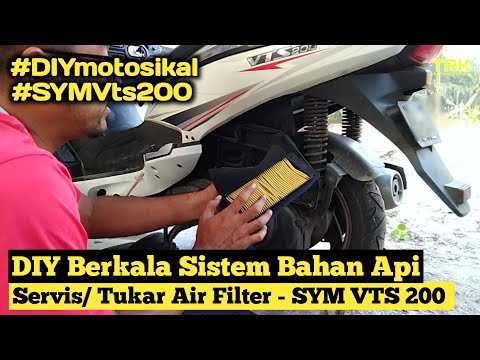
Vts 200
To replace the air filter on a Sym VTS 200, you need to loosen the screws that secure the cover of the air filter box, located directly above the gea…

Vts 200
Guide for changing the transmission oil of a Sym VTS 200cc scooter. Obtain a bottle of Motul Scooter Gear 2T/4T 80W90. Position the scooter on the ce…
ScegliAuto offers an extensive international collection of automotive tutorials available in 12 languages. Each guide combines instructional videos with original explanations written by experienced human editors, along with information about the car models covered.
|
How to reset the service reminder on a Yamaha XMAX 125 scooter
Reset the service reminder on the Yamaha XMAX 125 only after completing all the required scheduled maintenance. Insert the key and switch on the instrument panel. Press the "Select" button on the speedometer repeatedly until "ODO" appears. Press and hold the "Oil Change" button for about 10 seconds, or until the service reminder stops flashing and disappears from the display. Switch the ignition off and on again. by ScegliAuto More videos
|
|
For advertising on this site Write to info@scegliauto.com
ScegliAuto is not responsible for any inaccuracy of the data in the lists. To report any inaccuracy or your business (if you own the business in question), please write to info@scegliauto.com
Number of seconds to generate the page: 0.006
(c) ScegliAuto 2026 - info@scegliauto.com - Privacy policy - About us VAT number: IT01247470535 |
