
|
Do it yourself
| |||
| ||||


How to Replace the Remote Battery of the Tata Tigor?
Model: Tata Tigor
MK 1
- Years 2017-2024
To replace the remote battery of the Tata Tigor, press the button on the top of the key to lift the key blade: once the key blade is lifted, pry it out of its housing to detach the panel on the back of the device. Underneath, you will find the battery that needs to be removed from its slot: at this point, insert the new battery into its slot, cover everything with the panel, and check that everything works.
Posted on 1 October 2026 by ScegliAuto
Video tutorial
Related tutorials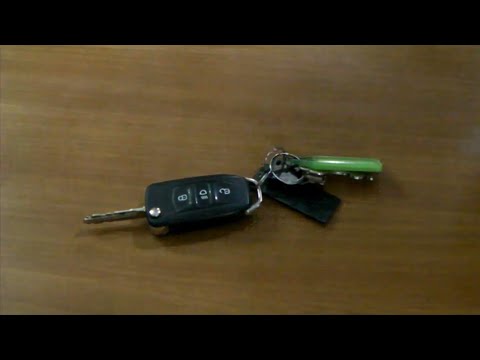
Tata Tigor
(2017-2024 /
MK 1)
Replacing the remote battery for the Tata Tigor, as shown in this tutorial, is an extremely simple and quick operation. To do this, you will need a r…

Tata Tigor
(2017-2024 /
MK 1)
Replacing the remote battery for the Tata Tigor, as shown in this tutorial, is an extremely simple and quick operation. First, obtain a replacement b…

Tata Tigor
(2017-2024 /
MK 1)
Today, you will see the necessary guide for disassembling and replacing the remote key battery for the Tata Tigor. First, take your remote and start …
Other guides you may be interested in
|
How to Disable the Eco Mode on the Peugeot 3008
Disabling the Eco mode on the Peugeot 3008 is a simple and quick task to perform, and today you will learn how to do this. To disable the ECO mode, you need to: - turn on the instrument cluster; - press the ECO button located on the window lift control panel; - turn off and then turn on the instrument cluster again; To reactivate the ECO mode, you will need to follow the same steps. The energy-saving mode activates when you need to conserve battery power, especially when the battery does not have enough charge to use all functions. by ScegliAuto More videos
|
|
For advertising on this site Write to info@scegliauto.com
ScegliAuto is not responsible for any inaccuracy of the data in the lists. To report any inaccuracy or your business (if you own the business in question), please write to info@scegliauto.com
Number of seconds to generate the page: 0.894
(c) ScegliAuto 2026 - info@scegliauto.com - Privacy policy VAT number: IT01247470535 |
