
|
Do it yourself
| |||
| ||||


Toyota C Hr - Onboard computerOnboard Computer Toyota C Hr (2023-2030 / mk 2) Toyota C Hr (2023-2026 / MK 2)
How to change the language of the GPS in the Toyota C-HR. In today's article, we will see how to change the GPS language of the Toyota C-HR. This guide can be useful because, by default, the navigator may be set to …Read all… Posted on 8 January 2026 by ScegliAuto  Toyota C Hr (2016-2023 / Ax50, MK 1, Ax10)
How to use and what are the features of the infotainment system in a 2021 Toyota C-HR? The infotainment system of the 2021 Toyota C-HR is a truly intuitive system, designed to make driving more comfortable and enjoyable. The heart of the system …Read all… Posted on 6 October 2025 by ScegliAuto  Toyota C Hr (2016-2023 / Ax50, MK 1, Ax10)
How to access the secret menu of the Toyota C-HR Today we will explain how to access the secret menu or engineer's menu on a Toyota C HR car. Turn on the onboard computer and select the button with the …Read all… Posted on 23 April 2025 by ScegliAuto  Toyota C Hr (2016-2023 / Ax50, MK 1, Ax10)
How to set the language on the Toyota C-HR on-board computer Setting the language on the on-board computer of the Toyota C-HR is a simple and quick operation to be carried out independently as it involves only three …Read all… Posted on 4 November 2024 by ScegliAuto  Toyota C Hr (2016-2023 / Ax50, MK 1, Ax10)
How Adaptive Cruise Control Works on the Toyota CHR To activate adaptive cruise control on the Toyota CHR, use the lever located on the right side of the steering column, beneath the steering wheel. Pressing the …Read all… Posted on 21 August 2026 by ScegliAuto 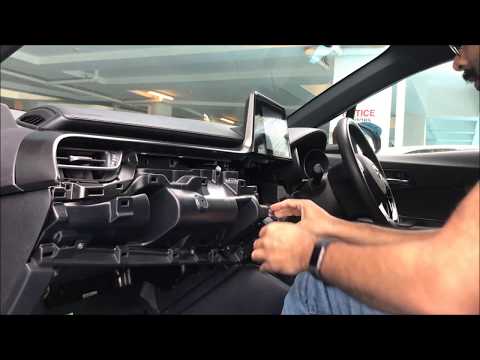 Toyota C Hr (2016-2023 / Ax50, MK 1, Ax10)
How to Replace the Central Unit and Display of the Toyota CH-R In this video tutorial, you will learn how to remove and replace the central display or multimedia system/dashboard computer of the Toyota CH-R. First, get …Read all… Posted on 6 September 2026 by ScegliAuto Onboard Computer Toyota C Hr (2016-2023 / ax 50, mk 1, ax 10)
Toyota C Hr (2023-2026 / MK 2)How to change the language of the GPS in the Toyota C-HR. In today's article, we will see how to change the GPS language of the Toyota C-HR. This guide can be useful because, by default, the navigator may be set to …Read all… Posted on 8 January 2026 by ScegliAuto
Toyota C Hr (2016-2023 / Ax50, MK 1, Ax10)How to use and what are the features of the infotainment system in a 2021 Toyota C-HR? The infotainment system of the 2021 Toyota C-HR is a truly intuitive system, designed to make driving more comfortable and enjoyable. The heart of the system …Read all… Posted on 6 October 2025 by ScegliAuto
Toyota C Hr (2016-2023 / Ax50, MK 1, Ax10)How to access the secret menu of the Toyota C-HR Today we will explain how to access the secret menu or engineer's menu on a Toyota C HR car. Turn on the onboard computer and select the button with the …Read all… Posted on 23 April 2025 by ScegliAuto
Toyota C Hr (2016-2023 / Ax50, MK 1, Ax10)How to set the language on the Toyota C-HR on-board computer Setting the language on the on-board computer of the Toyota C-HR is a simple and quick operation to be carried out independently as it involves only three …Read all… Posted on 4 November 2024 by ScegliAuto
Toyota C Hr (2016-2023 / Ax50, MK 1, Ax10)How Adaptive Cruise Control Works on the Toyota CHR To activate adaptive cruise control on the Toyota CHR, use the lever located on the right side of the steering column, beneath the steering wheel. Pressing the …Read all… Posted on 21 August 2026 by ScegliAuto
Toyota C Hr (2016-2023 / Ax50, MK 1, Ax10)How to Replace the Central Unit and Display of the Toyota CH-R In this video tutorial, you will learn how to remove and replace the central display or multimedia system/dashboard computer of the Toyota CH-R. First, get …Read all… Posted on 6 September 2026 by ScegliAuto Car stereo (2) Battery (8) Spark plugs (1) Body (1) Key (24) Onboard computer (6) Checks and maintenance (14) Dashboard (1) Air filter (3) Cabin air filter (2) Parking brake (1) Accessory kit (1) Side marker bulb (1) Headlight bulb (3) Interior dome light bulb (2) License plate light (3) Engine oil (1) Clock (7) Rear bumper (1) Tires (1) Shift knob (2) Instrument cluster (4) Wheel (1) Fuse box (10) Warning light – error code (9) (31) Tire pressure warning light (16) Service warning light (41) |
How to Connect the Cables to the Battery of the Citroen Xsara Picasso?
In this tutorial, you will see how to connect the cables to the battery of the Citroen Xsara Picasso, useful if you need to recharge it or perform an emergency start. First, ensure the key is not inserted, then open the bonnet and move to the front of the left headlamp. Next, locate the bolt just behind the filter box and connect the positive terminal clamp to it. Now you can connect the negative terminal to any point on the chassis, such as the indicated point. Once the operation is complete, ensure you disconnect the negative first and then the positive. by ScegliAuto More videos
|
|
For advertising on this site Write to info@scegliauto.com
ScegliAuto is not responsible for any inaccuracy of the data in the lists. To report any inaccuracy or your business (if you own the business in question), please write to info@scegliauto.com
Number of seconds to generate the page: 0.013
(c) ScegliAuto 2026 - info@scegliauto.com - Privacy policy VAT number: IT01247470535 |
