
|
Do it yourself
| |||
| ||||


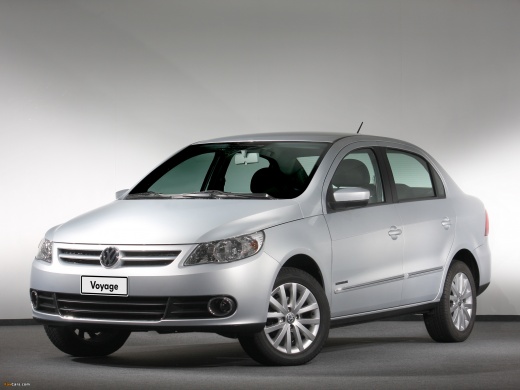
How to Replace the Remote Battery on a Volkswagen Voyage?
Model: Volkswagen Voyage
NF, G5
- Years:
2008, 2009, 2010, 2011, 2012, 2013, 2014, 2015, 2016, 2017, 2018, 2019
Video tutorial
In this tutorial, you will see how to replace the battery in the remote for a Volkswagen Voyage. For this simple and quick task, you will need a replacement CR2032 battery and a small Phillips screwdriver. First, extend the emergency key by pressing the top metal button, then unscrew the screw located inside the newly exposed slot. Once done, fully open the remote, remove the old battery, and insert the new one, making sure to position it correctly.
Updated on 1 June 2026 by ScegliAuto
Related tutorials
Volkswagen Voyage
(2008-2023 /
NF, G5)
Here are the main steps to remove and replace the manufacturer emblems on the Volkswagen Voyage. First, remove the manufacturer emblem located on the…
Volkswagen Voyage
(2008-2023 /
NF, G5)
Let's briefly review the instructions needed to perform the routine maintenance service by replacing the engine oil and oil filter on the Volkswagen …
Volkswagen Voyage
(2008-2023 /
NF, G5)
As we can see in this tutorial, resetting the service light on the Volkswagen Voyage is an extremely simple and quick operation. Before proceeding, m…
ScegliAuto offers an extensive international collection of automotive tutorials available in 12 languages. Each guide combines instructional videos with original explanations written by experienced human editors, along with information about the car models covered.
Other guides you may be interested in
|
How to Replace the Remote Battery of the Citroën C5 Aircross?
To replace the remote battery of the Citroën C5 Aircross, first remove the key from the device by sliding it out from the top. Once the key is removed, use a thin object to pry open the back cover of the device. This will allow you to detach the cover and access the battery underneath. At this point, you can insert a new battery and then cover everything with the corresponding panel. by ScegliAuto More videos
|
|
For advertising on this site Write to info@scegliauto.com
ScegliAuto is not responsible for any inaccuracy of the data in the lists. To report any inaccuracy or your business (if you own the business in question), please write to info@scegliauto.com
Number of seconds to generate the page: 0.124
(c) ScegliAuto 2026 - info@scegliauto.com - Privacy policy - About us VAT number: IT01247470535 |
