
|
Do it yourself
| |||
| ||||


How to Change the Engine Oil of a Yamaha XSR 155?
Model: Yamaha Xsr 155
Video tutorial
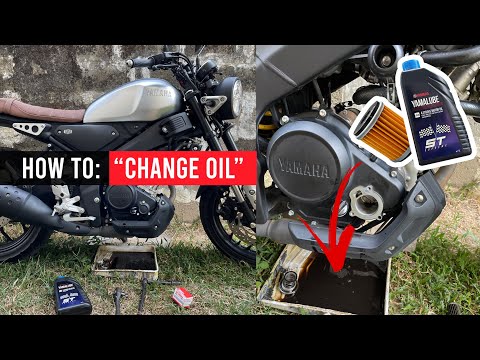
To change the engine oil of the Yamaha XSR 155, start by positioning the bike on a flat surface and ensure the engine is cold. Locate the oil drain plug on the underside of the engine and unscrew it with an appropriate spanner to allow the old oil to drain completely into a suitable container. While draining, check for any metallic residues in the oil. Clean the area around the drain plug thoroughly before refitting it. Next, locate the upper oil filler cap and remove it to allow air to enter and facilitate the complete drainage of the old oil. Once the oil has finished draining, securely re-screw the lower drain plug. Now, slowly pour the new oil into the upper oil filler hole. Use a funnel to avoid spills and check the owner's manual for the recommended quantity and type of oil. Finally, close the upper oil filler cap and ensure you dispose of the used oil correctly. By following these steps, you will keep your Yamaha XSR 155 in good working condition and extend the life of the engine.
Updated on 8 October 2026 by ScegliAuto
Related tutorials
Xsr 155
In this tutorial, you can see how to change the engine oil in the Yamaha XSR 155, a very simple and quick operation. First, ensure that the engine is…
Xsr 155
To change the engine oil in the Yamaha XSR 155, you need to loosen the screw that secures the oil drain plug located at the bottom centre of the bike…

Xsr 155
In this tutorial, you will see how to change the engine oil in a Yamaha XSR 155, an extremely simple and quick operation. First, ensure the engine is…
|
How to Adjust the Time on a Triumph Street Triple 1200 RS?
In this tutorial, you will see how to adjust the time on a Triumph Street Triple 1200 RS, a very simple and quick operation to perform, for example, after disconnecting the battery or when switching to daylight saving time. First, insert the key, then turn on the dashboard and navigate to the general menu on the display using the directional buttons on the left-hand dial. Next, enter "Date & Time", adjust both the clock and the date as needed, and save the setting by returning to the main screen. by ScegliAuto More videos
|
|
For advertising on this site Write to info@scegliauto.com
ScegliAuto is not responsible for any inaccuracy of the data in the lists. To report any inaccuracy or your business (if you own the business in question), please write to info@scegliauto.com
Number of seconds to generate the page: 0.005
(c) ScegliAuto 2026 - info@scegliauto.com - Privacy policy VAT number: IT01247470535 |
