
|
Do it yourself
| |||
| ||||


How to do MMI reset on Audi A4
Model: Audi A4
B9
- Years 2014-2024
Let's see in this short video tutorial how to reset the MMI system on an Audi A4 model B9, produced from 2014 to 2021. To begin we must turn on the instrument panel but without starting the vehicle, then let's move to the control panel of the console central, here to perform the reset, we must simultaneously press the "NAV / MAP" button, the "RADIO" button and the central wheel. Once all this is done we will see the central dashboard display turn off, so we wait about ten or so seconds for the system to restart and reinstall the maps.
Posted on 14 October 2022 by ScegliAuto
Video tutorial
Related tutorials
Audi A4
(2007-2016 /
B8)
In this video tutorial you can see how you can perform the MMI reset (reset) on Audi A4, by following a few simple steps that will guide you towards …

Audi A4
(2007-2016 /
B8)
Regarding the connection of the rear camera on an Audi A4 B8, an entire video is dedicated to a particularly delicate part, which is the connection o…

Audi A4
(2014-2024 /
B9)
To be able to reset the MMI system of the Audi A4 B9 you have to go and turn on the instrument panel, so that the car radio also turns on. At this po…
Other guides you may be interested in
|
How to Remove the Front Bumper Grille on a Ford Focus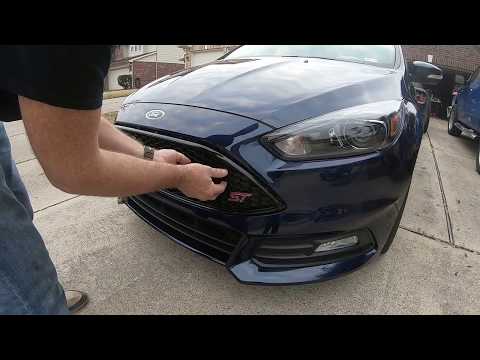
Want to replace the central air grille on your vehicle? Here’s how to remove the front bumper grille on a Ford Focus: using a plastic lever or screwdriver, pry between the bumper plastic and the grille, detach the securing clips located on it. Finally, remove the grille from the centre of the bumper, and compare it with the one that will replace it. To proceed with the installation: secure the grille onto the bumper by engaging the clips (apply pressure with your hands on the grille without breaking it). Check the correct installation of the parts. by ScegliAuto More videos
|
|
For advertising on this site Write to info@scegliauto.com
ScegliAuto is not responsible for any inaccuracy of the data in the lists. To report any inaccuracy or your business (if you own the business in question), please write to info@scegliauto.com
Number of seconds to generate the page: 0.068
(c) ScegliAuto 2026 - info@scegliauto.com - Privacy policy VAT number: IT01247470535 |
