
|
Do it yourself
| |||
| ||||


How to reset the service light on the Audi A4 B9 2017
Model: Audi A4
B9
- Years 2014-2024
In this new guide of ours dedicated to your Audi A4 B9 (year 2017) we are going to find out how to reset the service warning light completely manually and therefore without using a special professional diagnostic tool. First of all, go inside the car and reach the driver's seat. Start the instrument panel and immediately afterwards also the central display of the infotainment system. At this point, select the "Car servicing and Checks" option. Scroll through the menu and then select "Service intervals". Finally, click on "Reset oil change interval" and confirm the operation.
Posted on 4 March 2023 by ScegliAuto
Video tutorial
Related tutorials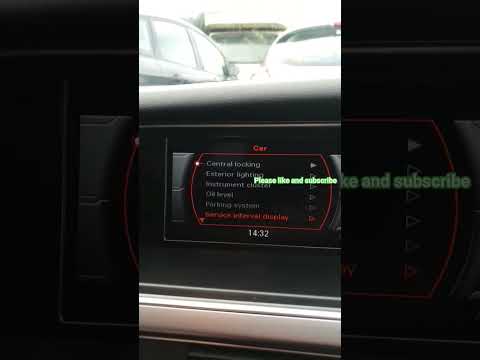
Audi A4
(2014-2024 /
B9)
If you own an Audi A4 B9 and want to learn how to manually reset the service indicator, then all you have to do is carefully read our new guide and f…

Audi A4
(2014-2024 /
B9)
Let's see how to reset the service light on an Audi A4 B9: we have just changed the oil and filter and now we need to reset the service light that ap…

Audi A4
(2014-2024 /
B9)
To reset the "Service" light on an Audi A4, turn on the instrument panel without starting the engine. Use the buttons on the steering wheel to access…
Other guides you may be interested in
|
How to Remove the Interior Light of a Mini
Remove the interior light of a Mini: use a screwdriver or plastic lever to pry between the cover and the light itself (avoid damaging the headlining), pull the cover out from the panel and disconnect the power connector after removing it. Replace the damaged bulb with a new one (same size and voltage). Refit the light into its housing (push it in with your hands until the metal clips are fully locked). Test the light's functionality before completely refitting the piece. by ScegliAuto More videos
|
|
For advertising on this site Write to info@scegliauto.com
ScegliAuto is not responsible for any inaccuracy of the data in the lists. To report any inaccuracy or your business (if you own the business in question), please write to info@scegliauto.com
Number of seconds to generate the page: 0.153
(c) ScegliAuto 2026 - info@scegliauto.com - Privacy policy VAT number: IT01247470535 |
