
|
Do it yourself
| |||
| ||||


How to reset MMI multimedia system in Audi A6?
Model: Audi A6
MK 4, C7
- Years 2011-2018
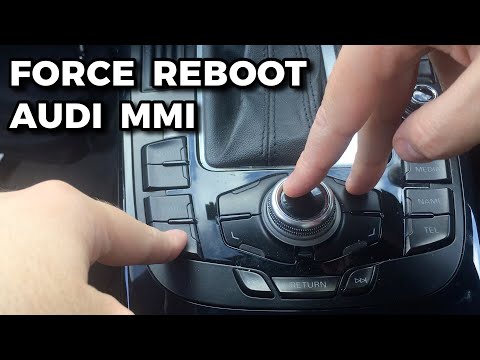
In the Audi A6 it can happen that the MMI multimedia system stops working, freezes or behaves abnormally. In this case, we can try to fix the problem by following the simple procedure shown in this tutorial. First of all, go inside the passenger compartment, then insert the key and turn on the instrument panel, you don't need to start the engine. Subsequently, hold down the "Setup" button, the central knob and the upper right arrow for about 10 seconds, or in any case for the time necessary for the screen to turn off. Finally, we wait for the complete restart of the system.
Posted on 9 March 2023 by ScegliAuto
Video tutorial
Related tutorials
Audi A6
(2011-2018 /
MK 4, C7)
In this tutorial we can see how to reset the MMI multimedia system in the Audi A6, an extremely simple and quick operation to be carried out, for exa…
Audi A6
(2018-2026 /
MK 5, C8)
The multimedia entertainment system MMI installed in Audi cars can be easily reset using just three buttons. These buttons are located on the central…

Audi A6
(2011-2018 /
MK 4, C7)
To reset the MMI system of the Audi A6, you will need to turn on the ignition by inserting the ignition key into the corresponding slot: once the ign…
Other guides you may be interested in
|
Frequently Asked QuestionsHow to Remove the Diesel Filter on a Ford Focus
How to remove the diesel filter on a Ford Focus? Lift the car on a column lift or suitable jack (if necessary), locate the diesel filter as shown in the video. Use a screwdriver to unscrew the metal piece that secures the filter (you can also use a socket spanner). After disconnecting all the circulation pipes and the fuel cable: remove the diesel filter housing from the vehicle (replace it with a new one). Finally, refit the filter to the attached diesel filter housing (connect the pipes and cables) and tighten the appropriate bolts. Close the bonnet. by ScegliAuto More videos
|
|
For advertising on this site Write to info@scegliauto.com
ScegliAuto is not responsible for any inaccuracy of the data in the lists. To report any inaccuracy or your business (if you own the business in question), please write to info@scegliauto.com
Number of seconds to generate the page: 0.131
(c) ScegliAuto 2026 - info@scegliauto.com - Privacy policy VAT number: IT01247470535 |
