
|
Do it yourself
| |||
| ||||


How to Refill and Reset the AdBlue Warning on Citroen C4 Picasso
Model: Citroen C4 Picasso
MK 2
- Years 2013-2022
If you see the AdBlue pollution control system pop-up on the dashboard of your Citroen C4 Picasso, you need to refill the fluid. Open the boot, lift the right side panel, and locate the tank cap (positioned at the top left of the folding seat). Open the tank and pour the required amount of fluid using a funnel; use a cloth or something similar to protect the carpet from any spills. Once you have poured the appropriate amount, securely close the cap and check that the AdBlue message is no longer displayed on the gauge.
Updated on 11 April 2026 by ScegliAuto
Video tutorial
Related tutorials
Citroen C4 Picasso
(2013-2022 /
MK 2)
Briefly, we will see the instructions that will allow us to reset the AdBlue refill warning light on the Citroen C4 Picasso 1.6 BlueHDi. First, open …

Citroen C4 Picasso
(2013-2022 /
MK 2)
If you notice the AdBlue warning light on the instrument panel while driving, and a message indicates that you need to top up the additive, you will …
Citroen C4 Picasso
(2013-2022 /
MK 2)
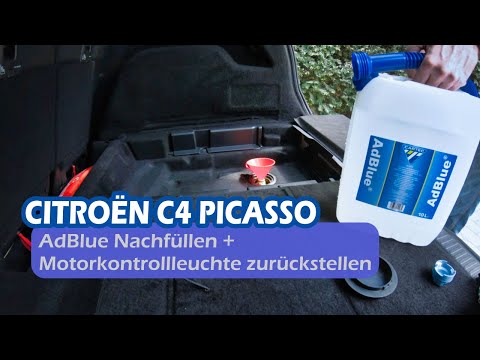
In this video, you will see how to top up AdBlue in the Citroen C4 Picasso after the warning light on the dashboard comes on. The AdBlue tank is loca…
Other guides you may be interested in
|
How to reset the tyre pressure warning light on a Hyundai Tucson
Below are the instructions to reset the tyre pressure warning light (TPMS) on a Hyundai Tucson. First, get into the vehicle and turn on the instrument cluster; then navigate to the vehicle settings until you reach the tyre pressure monitor, identifying the tyre with incorrect pressure. At this point, restore all tyre pressures according to the specifications indicated on the label; this will reset the TPMS and the warning light will be cleared from the instrument cluster! by ScegliAuto More videos
|
|
For advertising on this site Write to info@scegliauto.com
ScegliAuto is not responsible for any inaccuracy of the data in the lists. To report any inaccuracy or your business (if you own the business in question), please write to info@scegliauto.com
Number of seconds to generate the page: 0.277
(c) ScegliAuto 2026 - info@scegliauto.com - Privacy policy VAT number: IT01247470535 |
