
|
Do it yourself
| |||
| ||||


How to Change the Engine Oil of a Ducati Multistrada?
Model: Ducati Multistrada
Video tutorial
To replace the engine oil of a Ducati Multistrada, start by positioning the bike on a flat and stable surface. Next, lift the bike using the centre stand to facilitate access to the underside. Remove the oil filler cap to allow air into the system and aid the drainage of the used oil. Place a collection container under the drain plug and unscrew the plug with an appropriate spanner. Once removed, let the old oil drain completely into the collection container. After that, securely refit the drain plug. Then, fill the engine with new oil up to the recommended level, check the level, and start the engine to distribute the new oil evenly. Finally, check the oil level again to ensure it is correct. Once this process is complete, you have finished replacing the engine oil on your Ducati Multistrada.
Updated on 6 November 2026 by ScegliAuto
Related tutorials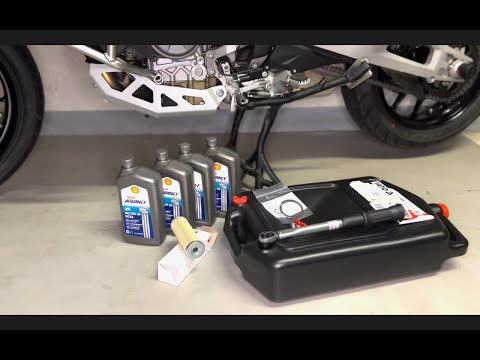
Multistrada
This guide explains how to perform routine maintenance on the Ducati Multistrada V4S by changing the engine oil and oil filter. First, place the bike…

Multistrada
In this tutorial, you will see how to change the engine oil in the Ducati Multistrada, a very simple and quick operation. First, ensure the engine is…

Multistrada
In this video tutorial, follow the instructions to replace the engine oil along with the oil filter, completing the regular service maintenance on a …
|
How to Set the Clock on the Suzuki Burgman 125
To adjust the clock on the Suzuki Burgman 125, turn on the instrument panel by turning the ignition key in the ignition switch: once the panel is on, press and hold both buttons on either side of the display. This will cause the clock to flash, and you can change the hours by repeatedly pressing the button on the left of the instrument panel; to change the minutes, perform the same operation by pressing the button on the right. After adjustment, return to the initial screen to confirm the change. by ScegliAuto More videos
|
|
For advertising on this site Write to info@scegliauto.com
ScegliAuto is not responsible for any inaccuracy of the data in the lists. To report any inaccuracy or your business (if you own the business in question), please write to info@scegliauto.com
Number of seconds to generate the page: 0.007
(c) ScegliAuto 2026 - info@scegliauto.com - Privacy policy VAT number: IT01247470535 |
