
|
Do it yourself
| |||
| ||||


How to adjust the clock of the Fiat Ducato
Model: Fiat Ducato
X250
- Years 2006-2014
Setting the time on the instrument panel of the Fiat Ducato is a very simple and quick operation, which can be done independently thanks to our short video tutorial. To set the new clock, we need to: - turn on the vehicle's instrument panel; - press the MODE button, located on the central dashboard; - scroll through the menu using the dimmer buttons; - select the "Set Time" option; - select the "Time" option; - adjust the hour and minutes as desired; once finished, return to the main menu and turn off and restart the instrument panel to complete the time setting procedure.
Posted on 4 May 2024 by ScegliAuto
Video tutorial
Related tutorials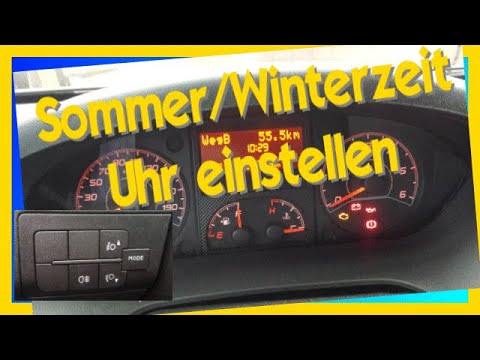
Fiat Ducato
(2006-2014 /
X250)
To be able to set the Fiat Ducato clock, turn on the instrument panel so that you can move within the menu that will appear: using the buttons at the…

Fiat Ducato
(2006-2014 /
X250)
The clock adjustment of the Fiat Ducato is done by turning on the instrument panel so that you can navigate within the menu that will be displayed: u…

Fiat Ducato
(1993-2016 /
MK 2)
The operation of modifying the clock in the Fiat Ducato can be carried out by turning on the instrument panel so that you can navigate within the men…
Other guides you may be interested in
|
How to Replace the Front Headlight on a Peugeot 308
As the first operation, you will need to release the bonnet using the designated lever to lift and secure it with the prop rod. This gives you access to the rear of the headlight. Before working in this area, disconnect the battery cables to protect any sensitive circuits. Returning to the back of the headlight, remove the protective cover that shields the connector powering the bulb. Disconnect it and extract the faulty bulb. Retrace the steps described for reassembling the various components. by ScegliAuto More videos
|
|
For advertising on this site Write to info@scegliauto.com
ScegliAuto is not responsible for any inaccuracy of the data in the lists. To report any inaccuracy or your business (if you own the business in question), please write to info@scegliauto.com
Number of seconds to generate the page: 0.080
(c) ScegliAuto 2026 - info@scegliauto.com - Privacy policy VAT number: IT01247470535 |
