
|
Do it yourself
| |||
| ||||


How to reset the ECU of the Geely Emgrand
Model: Geely Geely Various
If the control unit (ECU) of your Geely Emgrand is giving you major operating problems then you must perform a manual reset to resolve any momentary software errors. To do this, there is no dedicated function on the on-board computer but we proceed "the old way". In fact, you must first turn off the car completely and then open the front hood to gain access to the engine compartment. Then locate the ECU on the right side, lower the safety hook and raise it completely. Wait a few seconds and install it again by closing the safety hook. At this point the restoration has taken place and you just have to test the operation by starting the car.
Posted on 1 April 2022 by ScegliAuto
Video tutorial
Related tutorials
Geely Geely Various
In this guide today, we will go over the main instructions regarding the functions of the Geely Emgrand's infotainment system. First, let's get insid…

Geely Geely Various
If you still haven't been able to locate the fuse box inside your Geely Emgrand 2013, don't worry because in the following mini guide you will find a…

Geely Geely Various
In this tutorial, we can see how to replace the cabin filter in the Geely Emgrand GT, a very simple and affordable operation. Let's start by going to…
Other guides you may be interested in
|
How to Remove the Fuel Pump on Toyota Verso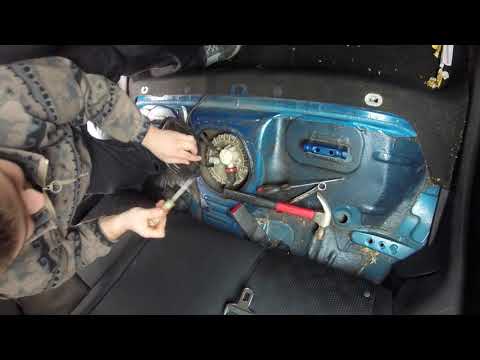
Let's see how to remove the fuel pump on a Toyota Verso. First, disconnect the battery cables, then remove the rear seat from the car. You will find various wiring and a metal piece with screws; unscrew the securing screws of the metal cap and remove it. Wrap the entire perimeter of the metal panel with paper or an absorbent cloth, then, using a screwdriver and hammer, unscrew the large bolt around the pump. Disconnect the power terminals and the fluid circulation tubes. Extract the fuel pump. To reassemble, proceed in reverse order. by ScegliAuto More videos
|
For advertising on this site Write to info@scegliauto.com
ScegliAuto is not responsible for any inaccuracy of the data in the lists. To report any inaccuracy or your business (if you own the business in question), please write to info@scegliauto.com
Number of seconds to generate the page: 0.052
(c) ScegliAuto 2026 - info@scegliauto.com - Privacy policy VAT number: IT01247470535 |
