
|
Do it yourself
| |||
| ||||


How to reset the oil light on the GMC Sierra?
Model: GMC Sierra
MK 3
- Years 2007-2014
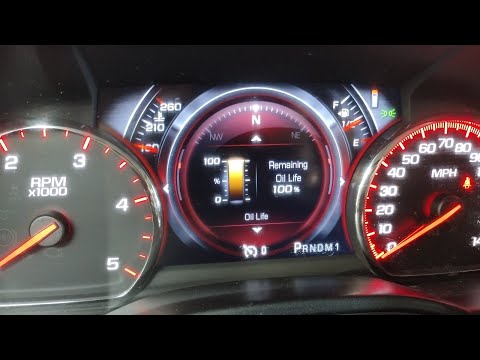
Let's make sure that all the doors of the GMC Sierra are properly closed and then turn the key without starting the engine. At this point, we need to use the accelerator pedal and press it all the way down three times in a row, as quickly as possible. Let's try to stay under five seconds total to ensure that the operation is successful. After completing this step, we can turn the key to the off position. By turning on the instrument panel, we can now verify that the oil change light has been reset. If it is still on, we repeat the procedure, trying to be faster in pressing the pedal.
Posted on 10 April 2023 by ScegliAuto
Video tutorial
Related tutorials
GMC Sierra
(2007-2014 /
MK 3)
The necessary procedure to manually reset the oil change alarm light on your 2011 GMC Sierra is quite simple, and below you will find all the necessa…
GMC Sierra
(2014-2018 /
MK 4)
If when you turn on your 2016 GMC Sierra you notice the engine oil light staying on despite having already changed the fluid and filter then all you …

GMC Sierra
(2014-2018 /
MK 4)
In this new guide dedicated to all of you who own a GMC Sierra, we will discover the various steps you need to follow if you intend to locate the fus…
Other guides you may be interested in
|
How to Remove the Front Seats from a Classic Fiat 500
How to remove the front seats from a classic Fiat 500? In this video, follow these steps: first, slide the seats forward and lift them up, then unscrew the retaining bolts on the rails fixed to the car's chassis using a socket or impact driver (use appropriate release agents if the bolts do not unscrew). Remove the retaining bolts at the bottom of the car (use spanners on both the upper and lower parts of the connecting bolts). Finally, install the new front seat by following the disassembly steps mentioned earlier. by ScegliAuto More videos
|
|
For advertising on this site Write to info@scegliauto.com
ScegliAuto is not responsible for any inaccuracy of the data in the lists. To report any inaccuracy or your business (if you own the business in question), please write to info@scegliauto.com
Number of seconds to generate the page: 0.109
(c) ScegliAuto 2026 - info@scegliauto.com - Privacy policy VAT number: IT01247470535 |
