
|
Do it yourself
| |||
| ||||


How to reset the oil light on the Honda Forza
Model: Honda Forza
Video tutorial
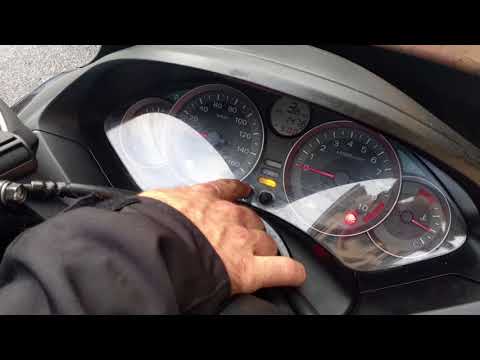
If the oil light on the display of your Honda Forza continues to stay on even after changing it, then you just need to proceed with manually resetting the light. Let's find out together how to do it. First of all, insert the key and turn on the display. Simultaneously, hold down the "Reset" button and wait another three seconds before releasing it. At this point, the oil light is finally off and the reset procedure is successfully completed. In case of errors during the procedure, you can safely turn off the display and repeat it from the beginning.
Posted on 29 August 2025 by ScegliAuto
Related tutorials
Forza
To reset the Oil Change light on a Honda Forza, keep the instrument panel off. While it is off, press and hold both the INFO A and INFO B buttons sim…
Forza
To reset the oil light on the Honda Forza 300, follow this procedure: first, turn off the engine. Once the engine is off, press and hold the right bu…

Forza
This video shows how to reset the oil warning light on a Honda Forza 125. It is recommended to perform this procedure only after changing the oil if …
|
How to remove the front wheel of the KTM Super Adventure 1290
In this video tutorial, you will learn how to remove and replace the front wheel of the KTM Super Adventure 1290 motorcycle, following the instructions provided below. First, place your motorcycle on the centre stand and begin to unscrew the fixing bolts of the front brake calipers; once removed, unscrew the central axle of the wheel to remove it from its hub, as shown in the video. At this point, if necessary, replace the tyre and refit the front wheel; finally, reinstall the brake calipers, following the video tutorial to the end! by ScegliAuto More videos
|
|
For advertising on this site Write to info@scegliauto.com
ScegliAuto is not responsible for any inaccuracy of the data in the lists. To report any inaccuracy or your business (if you own the business in question), please write to info@scegliauto.com
Number of seconds to generate the page: 0.006
(c) ScegliAuto 2026 - info@scegliauto.com - Privacy policy VAT number: IT01247470535 |
