
|
Do it yourself
| |||
| ||||


How to reset the service interval of the Hyundai I10
Model: Hyundai I10
AI3, AC3
- Years 2019-2026
In this video we can see how to reset the service light of the Hyundai I10 AI3 version: first of all we turn on the instrument panel, and on the display we will see the maintenance light come on, with the wrench symbol and the indication of kilometers (in this case it is miles) and days remaining. To reset it, we will use the multimedia screen. We press the "setup" physical button located on the right side of the control panel. Then we click on the vehicle icon, then we go to search, scrolling down the drop-down menu, to "convenience", and from there on the right side we select "service interval". Once we enter this menu we click on "reset", confirm and wait for the outcome.
Posted on 5 May 2025 by ScegliAuto
Video tutorial
Related tutorials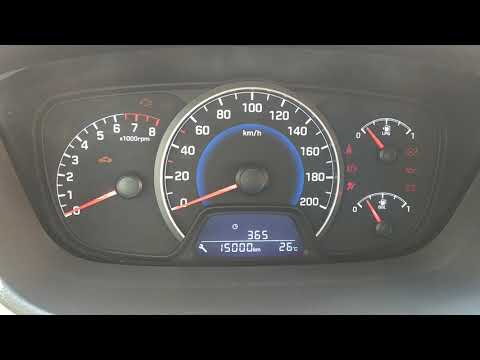
Hyundai I10
(2013-2020 /
IA, MK 2)
Resetting the service light on the Hyundai I10, as shown in this tutorial, is an extremely simple and quick operation. Before proceeding, ensure that…

Hyundai I10
(2019-2026 /
AI3, AC3)
If you own a third-generation Hyundai I10 and want to complete the manual service light reset procedure on your own, all you have to do is read the f…

Hyundai I10
(2013-2020 /
IA, MK 2)
In this tutorial we can see how to reset the service in the Hyundai I10, an extremely simple and quick operation, to be carried out only after comple…
Other guides you may be interested in |
How to Open a Stuck Boot on the Peugeot 407?
On the Peugeot 407, the boot may become stuck, possibly due to a problem with the control button or the lock actuator. In such cases, you can perform an emergency opening by following the simple procedure shown in this tutorial. First, open the rear doors, then lower the seat back by operating the release lever. Next, go inside the boot, locate the lock, and manually operate it using a flathead screwdriver. The boot will then be free to open. by ScegliAuto More videos
|
|
For advertising on this site Write to info@scegliauto.com
ScegliAuto is not responsible for any inaccuracy of the data in the lists. To report any inaccuracy or your business (if you own the business in question), please write to info@scegliauto.com
Number of seconds to generate the page: 0.152
(c) ScegliAuto 2026 - info@scegliauto.com - Privacy policy VAT number: IT01247470535 |
