
|
Do it yourself
| |||
| ||||


How do you reset the Service light in the Isuzu D-Max?
Model: Isuzu Isuzu D Max
Rt50, Rt85
- Years:
2011, 2012, 2013, 2014, 2015, 2016, 2017, 2018, 2019, 2020, 2021, 2022
Video tutorial
The use of cars or vehicles in general involves a series of regular and extraordinary maintenance. Regarding the regular maintenance, it is the service light that reminds us to carry it out, such as changing the motor oil, oil filter, pollen filter, and more, always following the manufacturer's instructions. Once these tasks are completed, we need to reset the aforementioned service light, and in the video we can see how to do it: Turn on the instrument panel and use the button located at the end of the right steering wheel lever to manage the future maintenance deadline and reset the service light.
Posted on 5 February 2025 by ScegliAuto
Related tutorials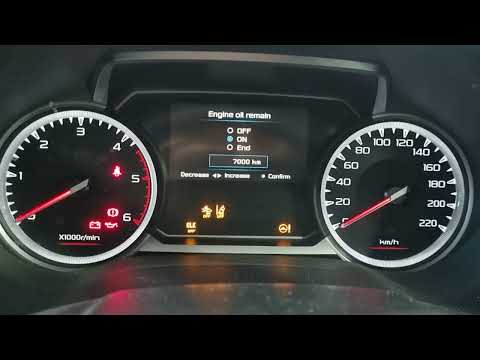
Isuzu Isuzu D Max
(2011-2024 /
Rt50, Rt85)
To manually reset the service light on your Isuzu D Max, follow these steps. First, get into the car and sit in the driver's seat. Insert the key and…

Isuzu Isuzu D Max
(2011-2024 /
Rt50, Rt85)
To reset the Service light on the Isuzu D-Max, insert the ignition key into the corresponding slot to turn on the instrument cluster. Once the igniti…

Isuzu Isuzu D Max
(2011-2024 /
Rt50, Rt85)
The Service light installed on the Isuzu D-Max can be reset by inserting the ignition key into the corresponding slot, turning it to turn on the inst…
Other guides you may be interested in
|
How to Reset the Tyre Pressure Warning Light on the Opel Mokka?
To reset the tyre pressure warning light on the Opel Mokka, turn on the ignition by inserting the key into the ignition switch. Once the ignition is on, navigate through the menu that appears on the dashboard by pressing the MENU button on the lever to the left of the steering wheel. When the tyre pressure option appears, press and hold the SET/CLR button located on the same lever. This will reset the warning light, and you can then turn off the ignition. by ScegliAuto More videos
|
|
For advertising on this site Write to info@scegliauto.com
ScegliAuto is not responsible for any inaccuracy of the data in the lists. To report any inaccuracy or your business (if you own the business in question), please write to info@scegliauto.com
Number of seconds to generate the page: 0.025
(c) ScegliAuto 2026 - info@scegliauto.com - Privacy policy VAT number: IT01247470535 |
