
|
Do it yourself
| |||
| ||||


How to adjust the time on the Kawasaki Z H2?
Model: Kawasaki Z H2
Video tutorial
In this tutorial, you will learn how to adjust the time on the Kawasaki Z H2. This operation is extremely simple and quick, to be performed after disconnecting the battery or when switching to daylight saving time. First, insert the key, then turn on the ignition and access the general menu by pressing the "SELECT" button on the right dial. Next, scroll through the various options using the directional buttons on the left dial, enter "Date and clock", then "Clock", and adjust the time as needed. To save the setting, return to the main screen.
Posted on 7 November 2026 by ScegliAuto
Related tutorials
Z H2
In this tutorial, we will see how to change the engine oil in a Kawasaki Z H2, a very simple and quick operation. First, ensure the engine is cool en…

Z H2
In this tutorial we can see how to replace the engine oil in the Kawasaki Z H2, an extremely simple and fast operation. First of all, we wait for the…

Z H2
To change the engine oil in a Kawasaki Z H2, you need to loosen the drain plug located at the central lower part of the bike: once removed, you can c…
|
How to remove the panels of the Peugeot Kisbee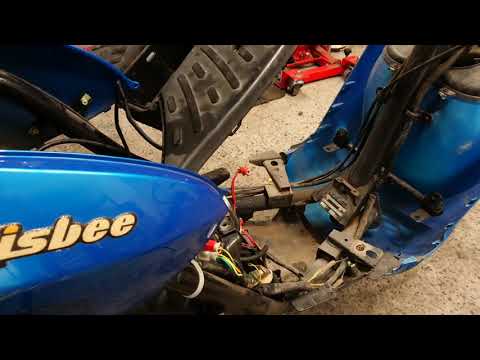
In this short and simple guide, you will see how to remove the plastic panels of the Peugeot Kisbee scooter, following the instructions provided below. First, place your scooter on the centre stand and begin by lifting the rider's seat; then, unscrew the fixing screws found in the under-seat compartment and under the footboard, subsequently removing the panels as shown in the video. At this point, unscrew the screws of the footboard to remove it, then remove the front shield (disconnecting the electrical connectors as well); finally, reassemble everything by applying the reverse procedure! by ScegliAuto More videos
|
|
For advertising on this site Write to info@scegliauto.com
ScegliAuto is not responsible for any inaccuracy of the data in the lists. To report any inaccuracy or your business (if you own the business in question), please write to info@scegliauto.com
Number of seconds to generate the page: 0.007
(c) ScegliAuto 2026 - info@scegliauto.com - Privacy policy VAT number: IT01247470535 |
