
|
Do it yourself
| |||
| ||||


How to Reset the Service Light on the Mercedes GLC?
Model: Mercedes Glc
C253, X253, MK 1
- Years 2015-2022
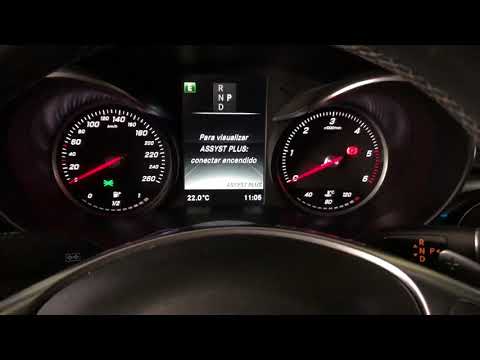
In this tutorial, you will see how to reset the service light on the Mercedes GLC, a very simple and quick operation to perform only after completing all scheduled maintenance work. First, enter the cabin, then insert the key and leave it in the initial position, reaching the screen displaying the odometer. Next, press and hold both the call button and the "OK" button, then select "ASSYST PLUS" from the menu that appears and turn on the ignition. Now, just enter "Full Service" and perform the reset using the "Confirm Service" option.
Posted on 3 July 2026 by ScegliAuto
Video tutorial
Related tutorials
Mercedes Glc
(2015-2022 /
C253, X253, MK 1)
In this tutorial we can see how to reset the service in the Mercedes GLC, an extremely simple and quick operation, to be carried out only after compl…
Mercedes Glc
(2015-2022 /
C253, X253, MK 1)
In this tutorial, you will see how to reset the service light on a Mercedes GLC, a very simple and quick operation to perform only after completing a…

Mercedes Glc
(2015-2022 /
C253, X253, MK 1)
In this tutorial, we can see how to reset the service in the Mercedes GLC, an extremely simple and quick operation, to be carried out only once all s…
Other guides you may be interested in
|
How to reset the tyre pressure warning light on the Dacia Sandero?
To reset the tyre pressure warning light on the Dacia Sandero, inflate all the tyres to the pressure indicated on the label on the driver's door. Once the tyres are inflated, turn on the ignition and navigate through the menu using the controls on the right side of the steering wheel. Scroll with the arrows to find the tyre pressure option: by holding down the OK button located on the right side of the steering wheel, you can reset the warning light. by ScegliAuto More videos
|

|
For advertising on this site Write to info@scegliauto.com
ScegliAuto is not responsible for any inaccuracy of the data in the lists. To report any inaccuracy or your business (if you own the business in question), please write to info@scegliauto.com
Number of seconds to generate the page: 0.125
(c) ScegliAuto 2026 - info@scegliauto.com - Privacy policy VAT number: IT01247470535 |
