
|
Do it yourself
| |||
| ||||


How to Reset the Oil Light on a Mini Cooper R52
Model: Mini Mini
R53, R52, R50
- Years 2001-2007
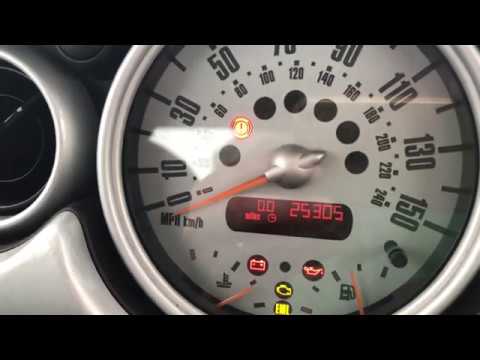
To manually reset the oil light on your Mini Cooper R52, carefully follow the steps described below. First, locate the small button to the right of the instrument cluster display, then press and hold this button while inserting the key and turning it to the first position. Wait a moment, then release the button as soon as a new screen appears on the display. Finally, press and hold the same button a second time and wait for the oil light reset to complete.
Posted on 24 May 2026 by ScegliAuto
Video tutorial
Related tutorials
Mini
(2001-2007 /
R53, R52, R50)
If the tire pressure warning light on your Mini Cooper R52 continues to stay on constantly on the instrument panel and you want to manually reset it,…
Mini
(2001-2007 /
R53, R52, R50)
In this video, find the instructions to reset the service warning light for the oil change on a Mini Cooper R50, second series. First, get inside the…

Mini
(2001-2007 /
R53, R52, R50)
On the Mini Cooper R520, R52, and R53 versions, we have a warning light that indicates brake pad wear. It is certainly a very useful warning light, b…
Other guides you may be interested in
|
Frequently Asked QuestionsHow to Adjust the Brightness of the Instrument Cluster on a Peugeot 3008?
To adjust the brightness of the instrument cluster on a Peugeot 3008, you need to turn on the ignition and access the settings via the menu located in the central area of the dashboard. In the screen that appears, select the "Display Configuration" option: now, by selecting the "Brightness" option, you can adjust it using the dedicated slider that will appear on the screen. The adjustment should be made with the headlights on as well as with them off. Once the adjustment is complete, you can turn off the instrument cluster. by ScegliAuto More videos
|
|
For advertising on this site Write to info@scegliauto.com
ScegliAuto is not responsible for any inaccuracy of the data in the lists. To report any inaccuracy or your business (if you own the business in question), please write to info@scegliauto.com
Number of seconds to generate the page: 0.290
(c) ScegliAuto 2026 - info@scegliauto.com - Privacy policy VAT number: IT01247470535 |
