
|
Do it yourself
| |||
| ||||


How to reset the instrument cluster on the Mini Cooper
Model: Mini Mini
R57, R55, R56
- Years 2007-2014
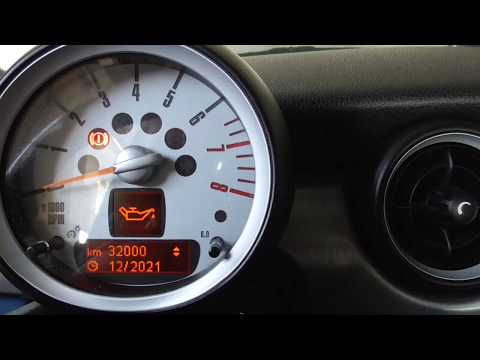
In this video we will see how to reset the instrument cluster in the Mini Cooper. Let's sit in the car and close the door. Now let's turn the key to position one, in order to turn on the instrument panel. Now hold down the two buttons that we find on the tachometer and the car will enter reset mode. Shortly after we will see the lights and the on-board computer light up and the hand will reach the full scale and then go back. The operation will last about thirty seconds. If we go to check in the menu the car will tell you that the reset has been performed correctly.
Posted on 4 July 2022 by ScegliAuto
Video tutorial
Related tutorials
…
Mini
(2007-2014 /
R57, R55, R56)
In order to reset the service warning light on your Mini Cooper R60 there is no need for any instrumentation. We start by turning the panel by puttin…

Mini
(2014-2023 /
F55, F54, F57, F56)
This video shows the procedure, as well as verbally described, to reset the service warning light of the Mini Cooper d. After turning on the ignition…
Other guides you may be interested in
|
Frequently Asked QuestionsHow to Replace the Rear Light and Bulbs on a Ford Focus Year 2000
To replace the rear light and bulbs on a Ford Focus 2000/2004, first, open the tailgate of the boot. This gives access to the screw that holds the rear light in place. The screw to undo (using an appropriate screwdriver) is located inside the light and corresponds to the fold that accommodates the tailgate (as shown in the images). Once you start to undo it, continue with the operation and then remove the nut from the inside of the bodywork. At this point, you can remove the light, being careful to disconnect the electrical supply by unplugging the connectors or removing the entire bulb holder from its housing. This way, you can replace the bulbs. To reassemble everything, simply follow the described operations in reverse order. by ScegliAuto More videos
|

|
For advertising on this site Write to info@scegliauto.com
ScegliAuto is not responsible for any inaccuracy of the data in the lists. To report any inaccuracy or your business (if you own the business in question), please write to info@scegliauto.com
Number of seconds to generate the page: 0.108
(c) ScegliAuto 2026 - info@scegliauto.com - Privacy policy VAT number: IT01247470535 |
