
|
Do it yourself
| |||
| ||||


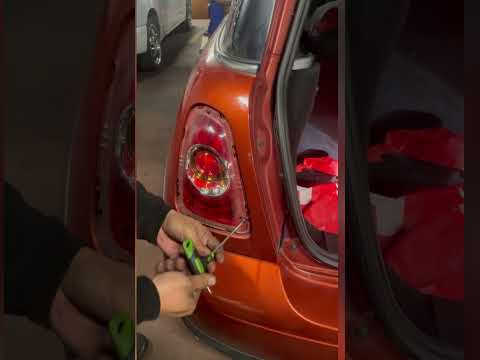
How to remove the rear light on the Mini Cooper?
Model: Mini Mini
R56, R55, R57
- Years 2007-2014
To remove the rear light on the Mini Cooper, detach the trim surrounding the light unit by prying it off with a thin object: once the trim is completely removed, you can access the fixing screws around the light. These can be fully removed with the appropriate screwdriver: at this point, open the bonnet and detach the side panel of the boot, pushing the light from the inside outwards. This will allow you to disconnect its connector and replace it with a new one.
Updated on 21 June 2026 by ScegliAuto
Video tutorial
Related tutorials
Mini
(2007-2014 /
R56, R55, R57)
Today, you will learn how to remove the rear lamp on a Mini Cooper for replacement. To remove the rear lamp, you will need a star screwdriver and a p…

Mini
(2007-2014 /
R56, R55, R57)
Before starting, open the front bonnet of your Mini Cooper. Begin by unscrewing and removing the bolts that secure the front headlamp to the vehicle.…
Mini
(2007-2014 /
R56, R55, R57)
If you need to remove one of the rear headlamps from your Mini Cooper R56 but don't know how, don't worry as we will explain step by step how to comp…
Other guides you may be interested in |
How to reset the tyre pressure warning light on the Suzuki Jimny?
To reset the tyre pressure warning light on the Suzuki Jimny, first inflate the tyres to the pressure value indicated on the corresponding sticker: this is located at the bottom of the driver's door pillar. Once the tyres are inflated, insert the ignition key and turn on the instrument panel: select the screen that indicates the tyre pressures, checking that the values change. After a few seconds, the tyre pressure warning light will automatically turn off. by ScegliAuto More videos
|

|
For advertising on this site Write to info@scegliauto.com
ScegliAuto is not responsible for any inaccuracy of the data in the lists. To report any inaccuracy or your business (if you own the business in question), please write to info@scegliauto.com
Number of seconds to generate the page: 0.112
(c) ScegliAuto 2026 - info@scegliauto.com - Privacy policy VAT number: IT01247470535 |
