
|
Do it yourself
| |||
| ||||


To reset the service indicator light on the Mini Countryman.
Model: Mini Mini
Countryman2, F60
- Years 2017-2023
In this short guide, we will see the necessary steps on how to reset the maintenance indicator light for the oil change of the Mini Countryman. First, we get inside the car and start the instrument panel; then, we press the button on the steering wheel to access the onboard computer menu of the car; once we are on the service option, we confirm the reset of the indicator on the central display, as shown in the video. At this point, we turn off and turn on the instrument panel, checking that the warning has been reset!
Posted on 28 July 2023 by ScegliAuto
This video is currently unavailable
Related tutorials
Mini
(2017-2023 /
Countryman2, F60)
You can reset the Service light that is indicated on the instrument panel of the Mini Countryman by turning on the ignition: once the ignition is act…

Mini
(2010-2016 /
Countryman1, R60)
To reset the Service indicator on the Mini Countryman, you need to turn on the instrument panel and then hold down the button on the right side of th…

Mini
(2010-2016 /
Countryman1, R60)
To reset the Service light on the Mini Countryman, you will need to turn on the instrument panel and then press and hold the button to the right of t…
Other guides you may be interested in
|
How to Remove the Gear Knob on a Renault Scenic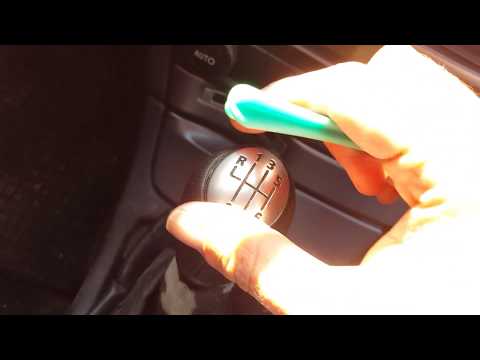
Want to replace the gear knob on a Scenic? Let’s see how to do it in this video. First, detach the leather gaiter cover from the edge of the centre console. Use a plastic spatula to remove the cap indicating the gear numbers. Grip the knob and twist it until it comes off the shaft. Disconnect the knob from the gaiter, fit a new one onto the gaiter (if the gaiter is damaged, replace it with a new one) and attach it to the metal shaft. Finally, secure the connectors of the leather gaiter onto the centre console. by ScegliAuto More videos
|

|
For advertising on this site Write to info@scegliauto.com
ScegliAuto is not responsible for any inaccuracy of the data in the lists. To report any inaccuracy or your business (if you own the business in question), please write to info@scegliauto.com
Number of seconds to generate the page: 0.097
(c) ScegliAuto 2026 - info@scegliauto.com - Privacy policy VAT number: IT01247470535 |
