
|
Do it yourself
| |||
| ||||


Renault Talisman - Onboard computerOnboard Computer Renault Talisman (2015-2023 / mk 1) Renault Talisman (2015-2023 / MK 1) How to Solve the Issue of an iPhone Not Playing Music on R-Link The issue we see in the Renault Talisman in the video is that the iPhone is connected to the R-Link, but the music does not play when selecting the "bluetooth" …Read all… Posted on 24 July 2026 by ScegliAuto  Renault Talisman (2015-2023 / MK 1) How to Connect iPhone Music Playback to the Renault Talisman On-Board Computer Today, we will explain how to connect your iPhone to the Renault Talisman on-board computer to play music. Access the on-board computer settings and select the …Read all… Posted on 17 February 2026 by ScegliAuto  Renault Talisman (2015-2023 / MK 1) How to access the settings of the onboard computer of the Renault Talisman. Today we will explain how to access the onboard computer settings of a Renault Talisman vehicle, produced from 2015 to 2023. To access the onboard computer, we …Read all… Posted on 23 December 2025 by ScegliAuto  Renault Talisman (2015-2023 / MK 1) How to reset the onboard computer in the Renault Talisman? In this tutorial we can see how to reset the onboard computer in the Renault Talisman, an extremely simple and quick operation, to be carried out for example …Read all… Posted on 16 July 2025 by ScegliAuto  Renault Talisman (2015-2023 / MK 1) How to deactivate the Start and Stop system of the Renault Talisman Today we will explain how to temporarily deactivate the start and stop system of the Renault Talisman. The steps to be taken are simple and quick. To be …Read all… Posted on 17 April 2025 by ScegliAuto 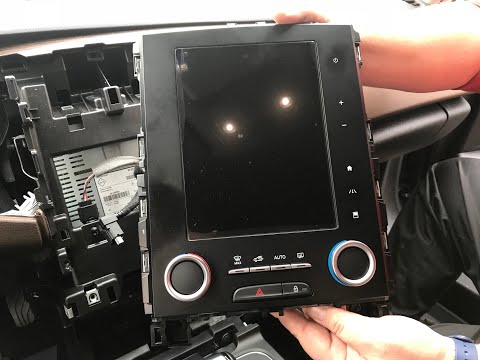 Renault Talisman (2015-2023 / MK 1) How to Remove the R-Link Navigation System from a Renault Talisman - Megane In this video tutorial, learn how to remove and replace the R-Link navigation or onboard computer from a Renault Talisman, as well as from a Megane. First, get …Read all… Posted on 23 August 2026 by ScegliAuto Car stereo (1) Glow plugs (1) Glove compartment (1) Key (1) Onboard computer (6) Checks and maintenance (6) Dashboard (1) Tail light (1) Air filter (3) Cabin air filter (2) Fuel filter (1) Diesel fuel filter (1) Oil filter (1) Light bulb (1) Engine oil (1) Door trim panel (2) Brake pads (1) Shift knob (4) Instrument cluster (1) Fuse box (8) AdBlue warning light (1) Warning light – error code (2) Tire pressure warning light (6) Service warning light (30) |
How to Open the Hood of the BMW X3
Today, you will learn how to open and close the hood of the BMW X3. To perform this simple operation, lift the hood release lever located next to the door seal on the driver’s side. After pulling the lever, you will notice that the hood will lift slightly. Position yourself in front of the hood and lift it after moving the internal lever from left to right. To keep the hood secure during maintenance, use the side support rod. To close the hood, simply let it fall back into place. by ScegliAuto More videos
|
|
For advertising on this site Write to info@scegliauto.com
ScegliAuto is not responsible for any inaccuracy of the data in the lists. To report any inaccuracy or your business (if you own the business in question), please write to info@scegliauto.com
Number of seconds to generate the page: 0.006
(c) ScegliAuto 2026 - info@scegliauto.com - Privacy policy VAT number: IT01247470535 |
