
|
Do it yourself
| |||
| ||||


How to Remove the R-Link Navigation System from a Renault Talisman - Megane
Model: Renault Talisman
MK 1
- Years 2015-2023
In this video tutorial, learn how to remove and replace the R-Link navigation or onboard computer from a Renault Talisman, as well as from a Megane. First, get inside the vehicle and begin by removing the central cover of the instrument panel; then unscrew the screws found underneath, as shown in the video. Once all panels are removed, unscrew the screws of the multimedia system to take it out of the dashboard; then disconnect the electrical connectors located at the back. Now replace and reassemble the onboard computer, following the reverse procedure!
Updated on 15 June 2026 by ScegliAuto
Video tutorial
Related tutorials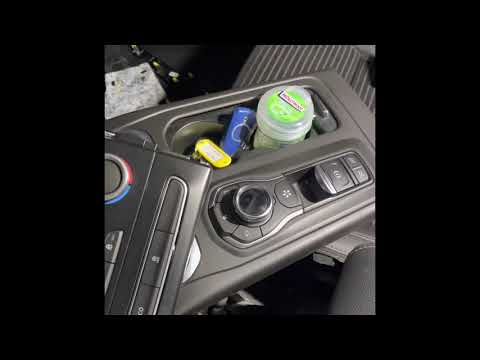
Renault Talisman
(2015-2023 /
MK 1)
This guide briefly outlines the steps to remove and replace the R-Link multimedia system in a Renault Talisman. First, get inside the vehicle and sta…

Renault Talisman
(2015-2023 /
MK 1)
The issue we see in the Renault Talisman in the video is that the iPhone is connected to the R-Link, but the music does not play when selecting the "…

Renault Talisman
(2015-2023 /
MK 1)
Today we will explain how to temporarily deactivate the start and stop system of the Renault Talisman. The steps to be taken are simple and quick. To…
Other guides you may be interested in
|
How to Check the Oil Level on a Jeep Renegade?
To check the oil level on a Jeep Renegade, you need to open the bonnet to access the components inside the engine bay: on the lower left side of the engine block, you will find the dipstick for checking the level. This should be pulled out and thoroughly cleaned with a cloth: once cleaned, reinsert it back into its tube and pull it out immediately after. This way, you can check that the oil mark is between the minimum and maximum levels; finally, you can place the dipstick back in its tube. by ScegliAuto More videos
|
|
For advertising on this site Write to info@scegliauto.com
ScegliAuto is not responsible for any inaccuracy of the data in the lists. To report any inaccuracy or your business (if you own the business in question), please write to info@scegliauto.com
Number of seconds to generate the page: 0.268
(c) ScegliAuto 2026 - info@scegliauto.com - Privacy policy VAT number: IT01247470535 |
