
|
Do it yourself
| |||
| ||||


How to Remove the Inner Door Panel in a Renault Clio
Model: Renault Clio
Clio 3, MK 3, Clio III
- Years:
2005, 2006, 2007, 2008, 2009, 2010, 2011, 2012, 2013
Video tutorial
To remove the inner door panel of a Renault Clio 3, fully open the door and locate all the fixing screws present in the handle, armrest, and behind any plastic covers. Remove the covers using a plastic lever and unscrew the screws with the appropriate tool. Once the fixings are removed, insert a panel removal tool between the trim and the door metal and unclip each retaining clip around the perimeter. Lift the panel upwards to free it from the upper edge near the glass. Before completely removing it, disconnect the connectors for the electric window lifters, speakers, and any lighting. After disconnecting all wiring, extract the panel from the door and store it safely.
Posted on 9 June 2026 by ScegliAuto
Related tutorials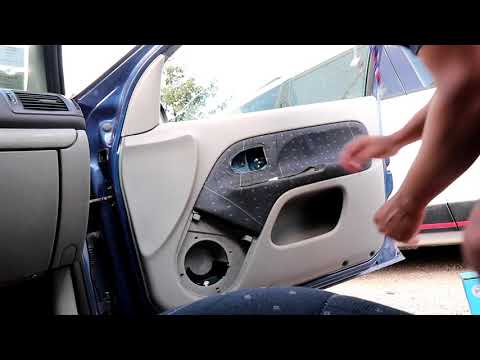
Renault Clio
(1998-2005 /
MK 2, Clio 2)
In today's tutorial, you will learn how to remove the internal door panel of a Renault Clio. First, open the front door and start by removing all the…

Renault Clio
(2005-2013 /
Clio 3, MK 3, Clio III)
To replace the tailgate lock on the Renault Clio, open the tailgate to access the four screws securing the inner panel to the tailgate: once these sc…

Renault Clio
(2012-2019 /
Clio IV, Clio 4, MK 4)
This guide provides information on how to remove the front door panel of the Renault Clio in simple steps. First, open the front door of the vehicle …
Other guides you may be interested in
|
How to Set the Time in an Audi A4?
In this tutorial, you will see how to set the time in an Audi A4, a very simple and quick operation to perform after replacing the battery or when the time changes. First, insert the key and turn on the instrument cluster. Then, press the "SETUP" button located on the center console. Next, press the upper left arrow button, navigate to the "Time" option, and use the central knob to adjust the clock. Finally, set any necessary formats and save by returning to the main screen. by ScegliAuto More videos
|
|
For advertising on this site Write to info@scegliauto.com
ScegliAuto is not responsible for any inaccuracy of the data in the lists. To report any inaccuracy or your business (if you own the business in question), please write to info@scegliauto.com
Number of seconds to generate the page: 0.031
(c) ScegliAuto 2026 - info@scegliauto.com - Privacy policy VAT number: IT01247470535 |
