
|
Do it yourself
| |||
| ||||



Fitting LED Bulbs to the Main Beam Headlamp of a Renault Clio IV
Model: Renault Clio
Clio IV, Clio 4, MK 4
- Years:
2012, 2013, 2014, 2015, 2016, 2017, 2018, 2019
Video tutorial
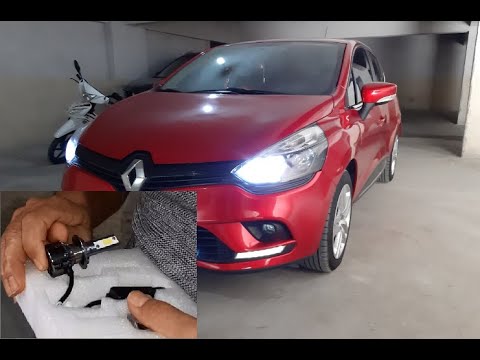
Fit the LED main beam bulbs to your Clio MK4. Access easily from the engine bay, near the front headlamp. Remove the connector, the spring clip, and take out the bulb. Disconnect the earth wire, which is a bit less accessible, then take the new LED bulb, remove the protective cap as it needs to be fitted before the bulb in its holder. Be very careful not to drop it into the bay, as it would be a big problem to retrieve! Hold it in place with the metal clip: now you can insert the new bulb - taking care not to touch it, as it would be damaged - reconnect the earth and the connector, and you can fit your larger cap (as the LED bulb needs more air than the other to function). Do the same on the other headlamp. Test the brightness of the main beams. The job is complete.
Updated on 3 July 2026 by ScegliAuto
Related tutorials
Renault Clio
(2012-2019 /
Clio IV, Clio 4, MK 4)
Here’s how to replace the front headlight bulbs of a Renault Clio. Open the bonnet and secure it. You will find the inspection caps for the headlight…

Renault Clio
(2005-2013 /
Clio 3, MK 3, Clio III)
In this video, we will see how to remove the front headlight bulbs on the Renault Clio third series. First, open the bonnet from the inside and secur…
Renault Clio
(2012-2019 /
Clio IV, Clio 4, MK 4)
In this video, you will learn how to replace the H7 dipped beam bulbs on the Renault Clio. In this case, we will install bulbs different from traditi…
Other guides you may be interested in |
How to Reset the AdBlue Warning Light on a Peugeot Boxer
To reset the AdBlue system on a 2018 Peugeot Boxer, follow these steps: Start the engine and ensure the vehicle is parked in a well-ventilated area. Locate the "MENU" button on the dashboard or steering wheel controls. Press and hold the "MENU" button until the menu options appear on the display. Use the arrow buttons or scroll wheel to access the "Vehicle Settings" or "Settings" menu. Select the "AdBlue" or "AdBlue System" option. Look for the "Recharge" or "Reset" option in the AdBlue menu. Once you find the reset option, select it and confirm your choice when prompted. The system will be reset, and a confirmation message may appear on the display. Turn off the engine and wait a few seconds. Restart the engine and check that the AdBlue system has been reset. by ScegliAuto More videos
|
|
For advertising on this site Write to info@scegliauto.com
ScegliAuto is not responsible for any inaccuracy of the data in the lists. To report any inaccuracy or your business (if you own the business in question), please write to info@scegliauto.com
Number of seconds to generate the page: 0.020
(c) ScegliAuto 2026 - info@scegliauto.com - Privacy policy VAT number: IT01247470535 |
