
|
Do it yourself
| |||
| ||||


Checking Injector Functionality and Replacement
Model: Renault Clio
MK 2, Clio 2
- Years:
1998, 1999, 2000, 2001, 2002, 2003, 2004, 2005
Video tutorial
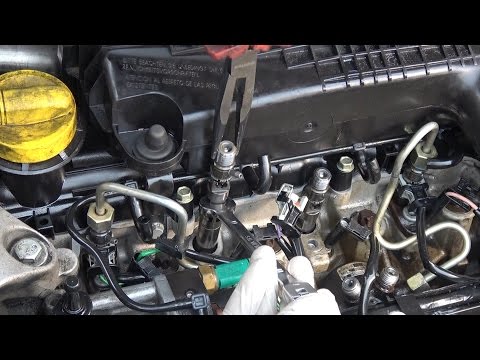
If the engine struggles to start and runs very unevenly after starting, emitting a lot of white smoke from the exhaust, there is likely a problem with the diesel atomisation or one of the injectors is not functioning correctly; start by checking that diesel is reaching each injector properly: unscrew the nut from the fuel line and try to start the engine: if diesel comes out from all the lines, it means it is reaching each injector regularly; then check the return: disconnect the return pipes and attach another pipe into a container for collecting the diesel and assess the volume: start the engine, possibly using a spray starter, and let it run for five minutes; the injectors corresponding to the fullest container are not atomising and not injecting diesel into the combustion chamber: they must be replaced. Unscrew the fuel lines, disconnect the connectors, unscrew the pin from the injector mounting bracket, remove the bracket, and then the injector; install the new ones, taking note of the code and reversing the steps. By repeating the return check, you will notice that the two new injectors recover very little while the other two do not: it would have been advisable to intervene on all four injectors.
Updated on 16 February 2026 by ScegliAuto
Related tutorials
Renault Clio
(1998-2005 /
MK 2, Clio 2)
Today we will see the main instructions on how to dismantle and replace the diesel injectors of the Renault Clio 1.5 dCi. First, let's open the car's…

Renault Clio
(2005-2013 /
Clio 3, MK 3, Clio III)
This guide shows how to replace the injectors on the Renault Clio 182. After opening the engine bay, locate the injector block; it is situated on the…
Renault Clio
(1998-2005 /
MK 2, Clio 2)
To test the injectors on a Renault Clio, open the bonnet and loosen the high-pressure connectors, then activate the starter motor. Tighten the connec…
Other guides you may be interested in |
Where are the fuses located on the Renault Laguna?
On the Renault Laguna, the fuses are located inside the fuse boxes installed in the vehicle: in this car model, you will find two boxes for containing the fuses. The first is in the fuse box on the left side of the dashboard, accessible by opening the driver's door: here you will find the fuses for the windscreen wipers, fog lights, horn, etc. The second box is located on the right side of the engine compartment: here you will find the fuses for the dipped headlights, radiator fan, alternator, etc. by ScegliAuto More videos
|
|
For advertising on this site Write to info@scegliauto.com
ScegliAuto is not responsible for any inaccuracy of the data in the lists. To report any inaccuracy or your business (if you own the business in question), please write to info@scegliauto.com
Number of seconds to generate the page: 0.024
(c) ScegliAuto 2026 - info@scegliauto.com - Privacy policy VAT number: IT01247470535 |
