
|
Do it yourself
| |||
| ||||


How to reset the service light on the Renault Captur
Model: Renault Captur
MK 1
- Years 2013-2019
In this video, it is shown how to reset the maintenance and oil change indicator on the Renault Captur. It is recommended to perform this procedure only after completing the oil change or service. This procedure is very simple and takes little time to complete. To reset the maintenance indicator, first start the instrument panel without starting the engine by turning the key two clicks. Then, using the arrow buttons on the side of the right lever, scroll through the menu until you find the option for services. Press and hold the down arrow button until the option for remaining maintenance time appears. Release the button and then press and hold it again until the maintenance interval is reset.
Posted on 20 January 2024 by ScegliAuto
Video tutorial
Related tutorials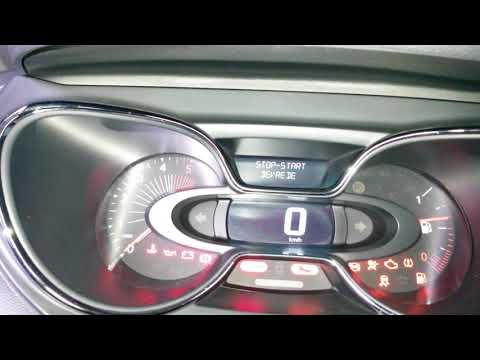
Renault Captur
(2013-2019 /
MK 1)
In the Renault Captur, the Service light can be reset by turning on the instrument panel, allowing navigation within the menu. To do this, you will n…

Renault Captur
(2013-2019 /
MK 1)
The Service light that is shown on the instrument panel of the Renault Captur can be reset by turning on the instrument panel, so that it is possible…

Renault Captur
(2013-2019 /
MK 1)
On the instrument panel of the Renault Captur, the Service light that is displayed can be completely reset by turning on the instrument panel, so tha…
Other guides you may be interested in
|
Frequently Asked QuestionsHow to Remove the Center Console on a Mercedes C-Class
Let's see how to remove the center console on a Mercedes C-Class. Use a plastic trim tool to pry off the cover located at the bottom of the center console. Remove the leather shift boot along with its plastic frame. After removing the cover, unscrew the fastening screws located at the top of the center console with a screwdriver. Once this is done, pull the console away and disconnect the power cables for the knob. Finally, insert the new piece into the center console area and reassemble all the components of the glove compartment as you disassembled them earlier. by ScegliAuto More videos
|

|
For advertising on this site Write to info@scegliauto.com
ScegliAuto is not responsible for any inaccuracy of the data in the lists. To report any inaccuracy or your business (if you own the business in question), please write to info@scegliauto.com
Number of seconds to generate the page: 0.105
(c) ScegliAuto 2026 - info@scegliauto.com - Privacy policy VAT number: IT01247470535 |
