
|
Do it yourself
| |||
| ||||


Replacing the RPM Sensor on a Smart Car
Model: Smart Smart
450
- Years:
1998, 1999, 2000, 2001, 2002, 2003, 2004, 2005, 2006, 2007
Video tutorial
Work with the engine off and the handbrake engaged. Remove the intercooler from the throttle body by loosening the clamp as shown in the video, then disconnect the connector from the throttle body. Remove the four bolts now accessible using an 8 mm socket. Disconnect the injection pipes and the hidden connector clearly shown in the video by pulling it while pressing both tabs. Remove the screw next to the connector, and finally, you can extract the RPM sensor from the crankshaft. Proceed in reverse for reassembly.
Updated on 17 April 2026 by ScegliAuto
Related tutorials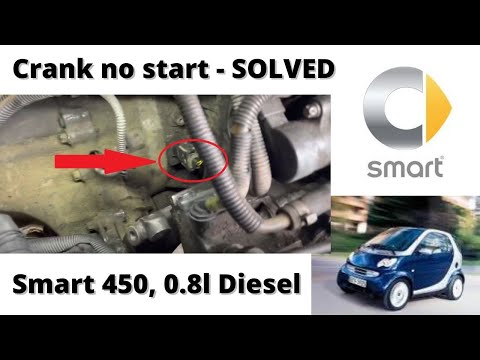
Smart
(1998-2007 /
450)
This video shows where the crankshaft RPM sensor is located in the Smart ForTwo, useful in case you need to replace it. As shown, the sensor is posit…

Smart
(2007-2015 /
451)
If the Smart Fortwo won't start, the most common problem is related to the crankshaft position sensor. This happens because the sensor mounted on the…

Smart
(2007-2015 /
451)
In this video, we can see where the crankshaft speed sensor is located on a Smart 451. It is positioned near the crankshaft pulley, on the side of th…
Other guides you may be interested in
|
How to Set the Time in an Audi A4?
In this tutorial, you will see how to set the time in an Audi A4, a very simple and quick operation to perform after replacing the battery or when the time changes. First, insert the key and turn on the instrument cluster. Then, press the "SETUP" button located on the center console. Next, press the upper left arrow button, navigate to the "Time" option, and use the central knob to adjust the clock. Finally, set any necessary formats and save by returning to the main screen. by ScegliAuto More videos
|
|
For advertising on this site Write to info@scegliauto.com
ScegliAuto is not responsible for any inaccuracy of the data in the lists. To report any inaccuracy or your business (if you own the business in question), please write to info@scegliauto.com
Number of seconds to generate the page: 0.025
(c) ScegliAuto 2026 - info@scegliauto.com - Privacy policy VAT number: IT01247470535 |
