
|
Do it yourself
| |||
| ||||


How to Replace the Brake Pedal Switch on a Smart?
Model: Smart Smart
450
- Years:
1998, 1999, 2000, 2001, 2002, 2003, 2004, 2005, 2006, 2007
Video tutorial
To replace the brake pedal switch on a Smart, secure the pedal using an object to keep it pressed down. Next, lift the car using a ramp and access the components located underneath: here, unscrew the screws that secure the cover of the gearbox to access the switch. The switch can then be disconnected and replaced with a new spare part; after replacement, refit the lower cover of the gearbox.
Updated on 3 May 2026 by ScegliAuto
Related tutorials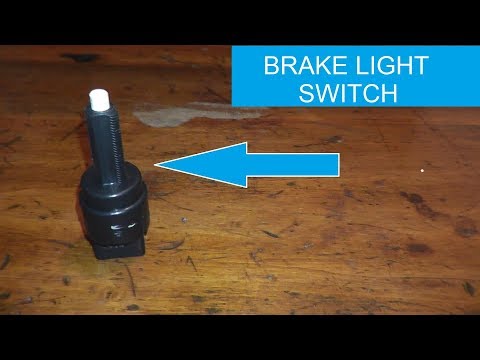
Smart
(2007-2015 /
451)
In this video, you will disassemble and replace the brake pedal switch on a Smart Fortwo, both first and second generation, by following these simple…

Smart
(2007-2015 /
451)
Follow the steps to remove and replace the rear brake switch on the Smart Fortwo, as outlined below. First, lift the vehicle and start unscrewing the…

Smart
(2007-2015 /
451)
In this video, we will see how to resolve the issue of a stuck gear on a Smart 451 (the famous three flashing dashes), where the vehicle remains stuc…
Other guides you may be interested in |
Frequently Asked QuestionsHow to Open the Fuel Flap on a Volkswagen Tiguan?
To open the fuel flap on a Volkswagen Tiguan, first unlock the car using the appropriate button on the remote. This will open the car and unlock the mechanism that controls the fuel flap. At this point, apply light pressure to the left side of the flap to open it and access the cap underneath. Once this is unscrewed, you can refuel and then close everything. by ScegliAuto More videos
|
|
For advertising on this site Write to info@scegliauto.com
ScegliAuto is not responsible for any inaccuracy of the data in the lists. To report any inaccuracy or your business (if you own the business in question), please write to info@scegliauto.com
Number of seconds to generate the page: 0.022
(c) ScegliAuto 2026 - info@scegliauto.com - Privacy policy VAT number: IT01247470535 |
