
|
Do it yourself
| |||
| ||||


How to set the time in the Smart ForTwo?
Model: Smart Smart
451
- Years 2007-2015
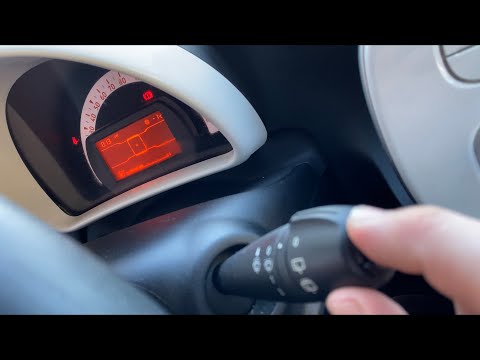
In this tutorial we can see how to adjust the time in the Smart ForTwo, an operation to be performed after being left with the battery on the ground or following the change to winter and summer time. First of all, turn on the instrument panel, then locate the button on the right of the dashboard and keep it pressed for about 3 seconds, until the time flashes. At this point we can increase the minutes using the same key, or decrease them with the opposite key, on the left of the panel. Once finished, without pressing any button for about 5 seconds, the setting will be saved automatically.
Posted on 8 April 2022 by ScegliAuto
Video tutorial
Related tutorials
Smart
(1998-2007 /
450)
Today we will discover the instructions that will allow us to set the time on the clock located on the dashboard of the Smart Fortwo, in simple and q…
Smart
(2007-2015 /
451)
To set the time on your Smart Fortwo, follow these steps. Turn on the instrument panel with the ignition key. Press the top button on the windshield …

Smart
(2007-2015 /
451)
These short and simple instructions will show us how to adjust the time on the display of the Smart Fortwo instrument panel. First, we get into the c…
Other guides you may be interested in
|
How to Replace the Fuel Filler Flap of a Volkswagen Golf
As the first step, open the fuel flap and unscrew the cap of the fuel filler neck. Just below the flap closure hook, there is a screw to unscrew. This way, you can easily pull the edge you just unscrewed with your hands. Be careful with the gasket present, and with great care, continue with the extraction of the flap. Once removed, you can make the necessary replacements. Now, retrace the steps described in reverse for reassembling the various components, and you're done! by ScegliAuto More videos
|

|
For advertising on this site Write to info@scegliauto.com
ScegliAuto is not responsible for any inaccuracy of the data in the lists. To report any inaccuracy or your business (if you own the business in question), please write to info@scegliauto.com
Number of seconds to generate the page: 0.154
(c) ScegliAuto 2026 - info@scegliauto.com - Privacy policy VAT number: IT01247470535 |
