
|
Do it yourself
| |||
| ||||


How do you reset the engine light on your Smart?
Model: Smart Smart
451
- Years 2007-2015
In order to reset the engine light of the Smart it is necessary to use a scanner to be able to identify what the light refers to, as this is a light that signals a generic problem. Therefore, once the problem has been identified, it will have to be solved by replacing or fixing the damaged component; once the problem has been solved, the scanner can be reconnected to the vehicle's OBD port, located at the bottom of the steering column. In this way it will be possible to select the car model in question and reset the warning light by following the instructions.
Posted on 9 March 2023 by ScegliAuto
Video tutorial
Related tutorials
Smart
(2014-2022 /
453)
Following these brief and simple instructions, we will see how to reset the maintenance reminder for the engine oil change of the Smart Fortwo. First…

Smart
(2007-2015 /
451)
If even after performing the regular maintenance of your Smart 451 (year 2007-2015) you notice that the alarm light continues to turn on on the dashb…

Smart
(2004-2006 /
454, Fourfour1)
Today's information will show us how to reset the maintenance service warning of the Smart Forfour, in simple and quick steps. First of all, we get i…
Other guides you may be interested in
|
Frequently Asked QuestionsReplacing the Timing Belt on a Land Rover Freelander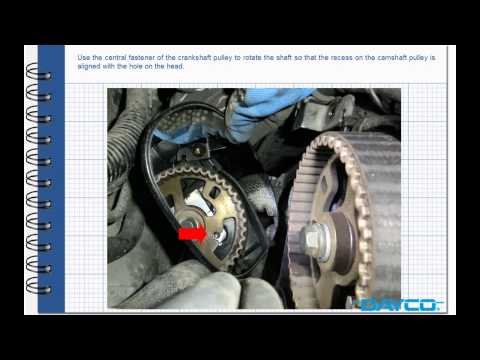
Prepare to replace the timing belt on a Land Rover Freelander: lift the bonnet, remove the engine soundproofing panel and the timing belt cover. Using a suitable spanner, loosen the tensioner pulley and slide the belt off its seat. After fitting the new belt, use the spanner to tension the tensioner pulley until the correct tension is achieved on the belt (previously fitted). Finally, check the tensioner and the belt itself, and tighten all previously removed components with a socket wrench. by ScegliAuto More videos
|

|
For advertising on this site Write to info@scegliauto.com
ScegliAuto is not responsible for any inaccuracy of the data in the lists. To report any inaccuracy or your business (if you own the business in question), please write to info@scegliauto.com
Number of seconds to generate the page: 0.052
(c) ScegliAuto 2026 - info@scegliauto.com - Privacy policy VAT number: IT01247470535 |
