
|
Do it yourself
| |||
| ||||


How to Reset the Oil Service on a SYM Jet X Scooter
Model: Sym Jet X 125
Video tutorial
In this tutorial, you will see how to reset the oil service on a SYM Jet X scooter, a very simple and quick operation. Before proceeding, ensure that you have completed all required scheduled maintenance tasks. Start by inserting the key and turning on the instrument cluster; it is not necessary to start the engine. Then, press the left button on the dashboard until you reach the service mileage labelled "Oil". Once done, hold down the right button for the necessary time until the interval resets correctly, and then restart the instrument cluster.
Updated on 31 August 2026 by ScegliAuto
Related tutorials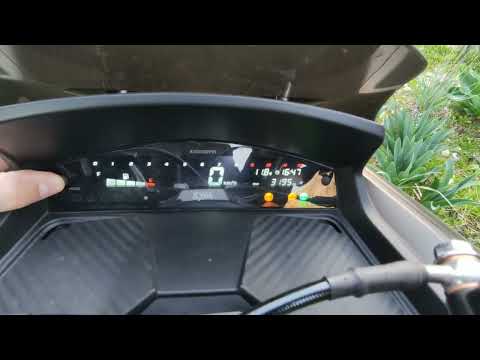
Jet X 125
Resetting the oil service on a SYM Jet X scooter, as shown in this tutorial, is an extremely simple and quick operation. Before proceeding, ensure yo…

Jet X 125
In this tutorial, learn how to set the time on the SYM Jet X scooter, a very simple and quick operation to perform after disconnecting the battery or…

Jet X 125
These brief instructions will show us how to reset the maintenance service light of the engine oil change for the Sym Jet X 125 scooter. First, put t…
|
How to replace the piston on a Derbi Senda 125?
To replace the piston on a Derbi Senda 125, completely remove the seat and take off all parts above the engine block. Next, disconnect the connectors and unscrew the bolts securing the cylinder to the top of the block, locating the piston inside. Remove the old piston from its connecting rod by loosening the retaining ring, and replace it with a new spare part. Finally, reassemble all the components that were removed earlier. by ScegliAuto More videos
|
For advertising on this site Write to info@scegliauto.com
ScegliAuto is not responsible for any inaccuracy of the data in the lists. To report any inaccuracy or your business (if you own the business in question), please write to info@scegliauto.com
Number of seconds to generate the page: 0.009
(c) ScegliAuto 2026 - info@scegliauto.com - Privacy policy VAT number: IT01247470535 |
