
|
Do it yourself
| |||
| ||||


How do you reset the tire pressure light in the Toyota Yaris?
Model: Toyota Yaris
Xp130
- Years 2011-2019
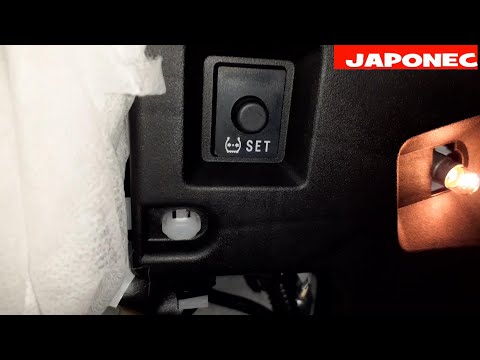
Following the instructions of the video guide here, we will have a very clear picture of what the inflation pressures of these are, remembering that we can find these values in the vehicle's user manual. But what happens in case of a puncture or other damage? The anomaly light on the instrument panel will come on and we will have to check and fix the issue. Finally, we will need to reset the previously mentioned light by pressing the Set button, located in the area of the vehicle's pedals. By doing this, the reset will occur immediately and there will be no need to perform any other operations.
Posted on 9 April 2025 by ScegliAuto
Video tutorial
Related tutorials
Toyota Yaris
(2011-2019 /
Xp130)
Even the Toyota Yaris, in its most recent versions, is equipped with tire pressure monitoring sensors. They are installed in the tire and signal when…
Toyota Yaris
(2020-2026 /
MK 4)
To reset the tyre pressure warning light on the Toyota Yaris, first inflate the tyres to the optimal pressure value, which is found on the sticker at…

Toyota Yaris
(2020-2026 /
MK 4)
From the instrument cluster of the Toyota Yaris, you can clear the tyre pressure warning light after inflating the car's tyres to the correct pressur…
Other guides you may be interested in
|
Frequently Asked QuestionsHow to Open the Fuel Filler Flap on a Hyundai i20?
In this tutorial, you will see how to open the fuel filler flap on a Hyundai i20, a very simple operation similar to that of many vehicles. First, go inside the cabin; it is not necessary to insert the key or unlock all the locks, then locate and operate the lever situated in the lower left area of the cabin, right next to the driver's seat. Once done, exit the vehicle, fully open the flap, and unscrew the fuel cap. To close the flap, simply press it gently until you hear a click. by ScegliAuto More videos
|
|
For advertising on this site Write to info@scegliauto.com
ScegliAuto is not responsible for any inaccuracy of the data in the lists. To report any inaccuracy or your business (if you own the business in question), please write to info@scegliauto.com
Number of seconds to generate the page: 0.096
(c) ScegliAuto 2026 - info@scegliauto.com - Privacy policy VAT number: IT01247470535 |
