
|
Do it yourself
| |||
| ||||



Where is the OBD2 port located in the 2018 Toyota Auris?
Model: Toyota Auris
E180
- Years:
2012, 2013, 2014, 2015, 2016, 2017, 2018
Video tutorial
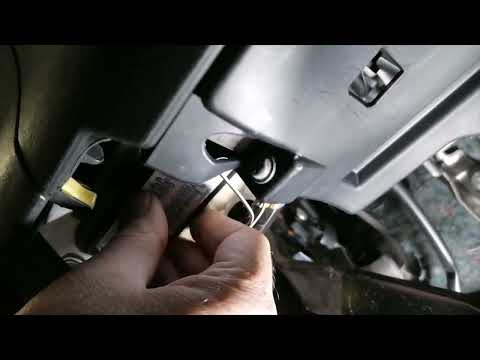
The OBD2 connector became mandatory on all vehicles starting in the 2000s; this special connector is used to connect the vehicle to diagnostic computers that allow scanning the car for issues related to one or more electrical components. On 2018 Toyota Auris vehicles, the connector is located inside the cabin; specifically, at the bottom of the dashboard on the driver's side, just above the pedal area. The connector, indicated by the white color, is covered by a plastic cover that, once removed, allows for its use.
Posted on 19 January 2026 by ScegliAuto
Related tutorials
Toyota Auris
(2007-2012 /
E150)
If the cigarette lighter socket in your Toyota Auris has suddenly stopped working, first check the status of the respective fuse, the location of whi…
Toyota Auris
(2007-2012 /
E150)
If you own a first-generation Toyota Auris (2007-2012) and want to find the box containing all the vehicle's fuses, carefully read and follow these i…

Toyota Auris
(2007-2012 /
E150)
In this video, you can see where the cabin filter is located in the Toyota Auris and how to proceed if you need to replace it, a very simple and quic…
ScegliAuto offers an extensive international collection of automotive tutorials available in 12 languages. Each guide combines instructional videos with original explanations written by experienced human editors, along with information about the car models covered.
Other guides you may be interested in |
How to Manually Adjust the Time on the Kia Sportage 3
In this new guide dedicated to your Kia Sportage third generation (2010-2016), you will learn how to manually change the time displayed on the car's onboard computer. The entire procedure takes just a few seconds. Let's see how. First, enter the cabin and turn on both the ignition and the radio display. Then press the "Setup/Clock" button located on the right side of the radio and use the knob to select the "Clock" option. Finally, select the "Time" option and proceed to adjust the hour and minute digits. by ScegliAuto More videos
|
|
For advertising on this site Write to info@scegliauto.com
ScegliAuto is not responsible for any inaccuracy of the data in the lists. To report any inaccuracy or your business (if you own the business in question), please write to info@scegliauto.com
Number of seconds to generate the page: 0.016
(c) ScegliAuto 2026 - info@scegliauto.com - Privacy policy - About us VAT number: IT01247470535 |
