
|
Do it yourself
| |||
| ||||


How to reset the tire pressure sensor on a Volkswagen Passat cc
Model: Volkswagen Passat Cc
MK 1
- Years 2008-2018
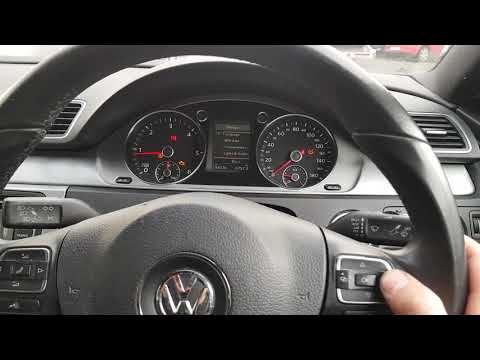
Turn on the instrument panel: enter the cabin and turn on the instrument panel of your Volkswagen Passat CC. Navigate the settings menu: scroll through the screens to the right until you reach the settings menu. Select "Tyre pressures": Within the settings menu, look for the option "Tyre pressures". Save the settings: move the selector to the "Store" option and press the "OK" button. This will reset the tire pressure warning light. Restart the vehicle: to complete the reset, simply restart the vehicle. Before resetting, it is recommended to actually check the condition and pressure of the tires.
Posted on 16 December 2024 by ScegliAuto
Video tutorial
Related tutorials
Volkswagen Passat Cc
(2008-2018 /
MK 1)
Resetting the service in the Volkswagen Passat CC, as we can see in this tutorial, is an extremely simple and quick operation. Before proceeding, we …
Volkswagen Passat Cc
(2008-2018 /
MK 1)
In this tutorial we can see how to reset the tire pressure warning light in the Volkswagen Passat CC, an extremely simple and quick operation, to be …

Volkswagen Passat Cc
(2008-2018 /
MK 1)
In this tutorial we can see how to reset the service in the Volkswagen Passat, an extremely simple and quick operation, to be carried out only once a…
Other guides you may be interested in
|
How to reset the tire pressure sensor of the Hyundai Tucson
Below we will discover the instructions that will allow us to reset the tire pressure warning light (TPMS) of the Hyundai Tucson. First of all, we get into the car and turn on the instrument panel; then we go to the vehicle settings until we reach the tire pressure monitor, identifying the tire with the incorrect pressure. At this point, we proceed to restore all tire pressures, following the pattern indicated on the label; in this way the TPMS system will be reset and the warning light will be reset by the instrument panel! by ScegliAuto More videos
|
|
For advertising on this site Write to info@scegliauto.com
ScegliAuto is not responsible for any inaccuracy of the data in the lists. To report any inaccuracy or your business (if you own the business in question), please write to info@scegliauto.com
Number of seconds to generate the page: 0.061
(c) ScegliAuto 2026 - info@scegliauto.com - Privacy policy VAT number: IT01247470535 |
