
|
Do it yourself
| |||
| ||||


How to Reset the Tire Pressure Light on a Volvo XC60?
Model: Volvo Xc60
MK 2
- Years 2017-2026
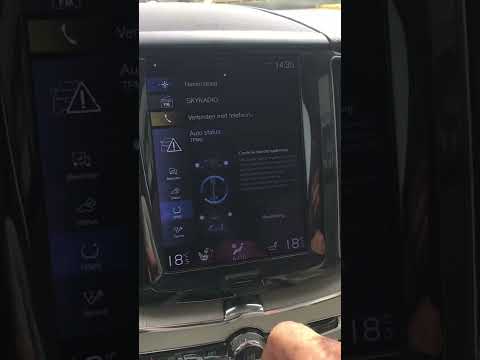
You can completely eliminate the tire pressure light from the instrument cluster of the Volvo XC60 by inflating the tires to the recommended pressure: this value will be indicated on the sticker attached to the driver’s door pillar. Once the tires are inflated, navigate to the menu that appears on the display in the center of the dashboard: select "Vehicle Status" and then "Store Pressure." This will display a confirmation message asking if you really want to reset the light: by selecting "Confirm," you can make the light disappear.
Posted on 5 March 2026 by ScegliAuto
Video tutorial
Related tutorials
Volvo Xc60
(2017-2026 /
MK 2)
Today, we will go over the instructions to reset the Tire Pressure Monitoring System (TPMS) light on a Volvo XC60. Before recalibrating the TPMS sens…
Volvo Xc60
(2017-2026 /
MK 2)
To reset the tire pressure light on a Volvo XC60, first inflate the tires to the correct pressure: this value is found on the sticker inside the driv…

Volvo Xc60
(2017-2026 /
MK 2)
In this guide, you will learn the steps to reset the tire pressure light on the Volvo XC60. Before recalibrating the TPMS sensors, ensure that all fo…
Other guides you may be interested in
|
How to deactivate the START&STOP system of the Peugeot 3008
The START&STOP system of the Peugeot 3008 can be temporarily deactivated manually using the button located on the dashboard. To deactivate the system, if you want to save battery charge, press the system button on the lower centre console and press the accelerator pedal. Once the system is deactivated, a warning light will illuminate on the vehicle's instrument panel and will turn off automatically when the system is reactivated by simply pressing the START&STOP button and pressing the accelerator pedal. by ScegliAuto More videos
|
|
For advertising on this site Write to info@scegliauto.com
ScegliAuto is not responsible for any inaccuracy of the data in the lists. To report any inaccuracy or your business (if you own the business in question), please write to info@scegliauto.com
Number of seconds to generate the page: 0.086
(c) ScegliAuto 2026 - info@scegliauto.com - Privacy policy VAT number: IT01247470535 |
