
|
Do it yourself
| |||
| ||||


How to install an Android radio on an Alfa Romeo Giulietta
Model: Alfa Romeo Giulietta
MK 1
- Years 2010-2020
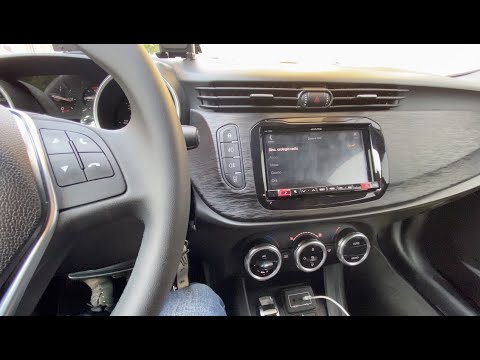
In this video we see how to install an Android radio on an Alfa Romeo Giulietta: we will need a screwdriver, a set of spatulas to remove the dashboard, the power kit, the CANBUS device, and the flat 2DIN stereo, which we can easily find online; we will also need a 2DIN frame, which we will have to replace with our old dashboard, and then mounting clips and brackets; we follow the youtuber's instructions: if there is no cap inside the glove compartment we have avoided a hassle. We lever on the outer side of the dashboard and pull it away until we expose the radio unit; we unscrew the four screws and disconnect the electrical connectors. Depending on the car model, we will need the power kit adapter, based on the plug we will find inside the radio compartment. We attach the cables to the CANBUS and then to the radio, then we connect the power supply. We do a functionality test before proceeding to the mounting. Now we will install the appropriate frame, attaching the brackets that are part of the kit, to the sides of the car radio, and then we mount the radio on the dashboard. Now it's time to fix the frame by making it adhere to the radio and the dashboard. Now we need to configure the steering wheel controls: we go to settings, where it will ask for the radio PIN, we select the CANBUS name and the car model.
Posted on 31 January 2025 by ScegliAuto
Video tutorial
Related tutorials
Alfa Romeo Giulietta
(2010-2020 /
MK 1)
Today, you will learn how to remove and replace the standard radio in an Alfa Romeo Giulietta by following the instructions below. First, get in the …

Alfa Romeo Giulietta
(2010-2020 /
MK 1)
This guide shows how to remove and replace the standard radio with a 2Din unit in the Alfa Romeo Giulietta, following the instructions below. First, …
Alfa Romeo Giulietta
(2010-2020 /
MK 1)
In today's video, you will learn how to set the time on the radio of the Alfa Romeo Giulietta. First, turn on the ignition of the vehicle. Go to the …
Other guides you may be interested in
|
How to reset the tyre pressure warning light on a Hyundai Tucson
Below are the instructions to reset the tyre pressure warning light (TPMS) on a Hyundai Tucson. First, get into the vehicle and turn on the instrument cluster; then navigate to the vehicle settings until you reach the tyre pressure monitor, identifying the tyre with incorrect pressure. At this point, restore all tyre pressures according to the specifications indicated on the label; this will reset the TPMS and the warning light will be cleared from the instrument cluster! by ScegliAuto More videos
|
|
For advertising on this site Write to info@scegliauto.com
ScegliAuto is not responsible for any inaccuracy of the data in the lists. To report any inaccuracy or your business (if you own the business in question), please write to info@scegliauto.com
Number of seconds to generate the page: 0.086
(c) ScegliAuto 2026 - info@scegliauto.com - Privacy policy VAT number: IT01247470535 |
