
|
Do it yourself
| |||
| ||||



How to reset the service indicator light on the Audi A6
Model: Audi A6
C7, MK 4
- Years:
2011, 2012, 2013, 2014, 2015, 2016, 2017, 2018
Video tutorial
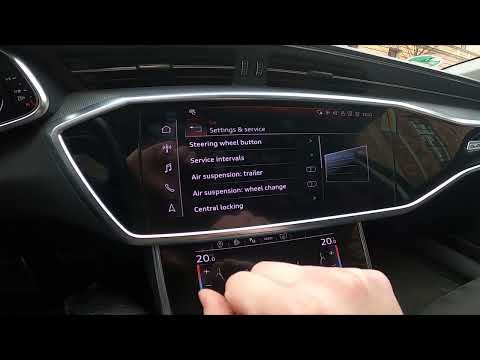
Today's information will allow us to reset the service light for the regular maintenance of the oil change for the Audi A6. First, we get on board the car and start the instrument panel; using the controls on the center console, we will go to the car settings and then to the maintenance interval and service section, as shown in the video. At this point, we scroll down to confirm and reset the service reminder, thus resetting the oil life; we verify the correct resetting of the maintenance key on the instrument panel.
Posted on 12 November 2025 by ScegliAuto
Related tutorials
Audi A6
(1997-2004 /
MK 2, C5)
In this very short tutorial today, we will see how to reset the service light on an Audi A6, model C5, produced from 1997 to 2004. This operation is …

Audi A6
(2004-2012 /
C6, MK 3)
Here is shown, in the video above, the way in which we can reset the Service light of the Audi A6 C6. It is very easy, especially because there is no…
Audi A6
(2018-2026 /
MK 5, C8)
In this new mini guide for all Audi A6 C8 (2018-2023) owners, you will learn how to manually reset the service light without the need for a professio…
Other guides you may be interested in |
How to reset the tyre pressure warning light on the Dacia Sandero?
The tyre pressure warning light that appears on the instrument cluster of the Dacia Sandero can be reset by inflating the tyres until they reach the correct pressure value: this value is indicated on the sticker attached to the driver’s door pillar. Once the inflation is complete, navigate through the menu that appears on the instrument cluster to find the option related to the tyres: select this with the OK button, which should then be held down for a few seconds to completely turn off the light. by ScegliAuto More videos
|
|
For advertising on this site Write to info@scegliauto.com
ScegliAuto is not responsible for any inaccuracy of the data in the lists. To report any inaccuracy or your business (if you own the business in question), please write to info@scegliauto.com
Number of seconds to generate the page: 0.142
(c) ScegliAuto 2026 - info@scegliauto.com - Privacy policy VAT number: IT01247470535 |
