
|
Do it yourself
| |||
| ||||


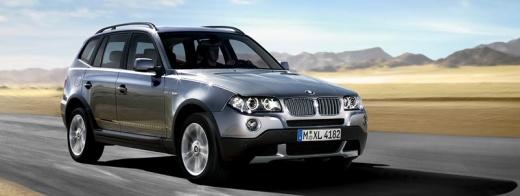
How to Connect Your Phone to the BMW X3 Bluetooth
Model: BMW X3
E83, MK 1
- Years:
2003, 2004, 2005, 2006, 2007, 2008, 2009, 2010
This video is currently unavailable
In today's video, learn how to connect your phone to the multimedia system of the BMW X3 via Bluetooth. First, note the unlock code. You can find it on the left side of your car's trunk. Once you have that, return to the inside of the car. Press and hold the button located under the front armrest. At the same time, turn the ignition key, and you can start searching for the radio on your device. Proceed with the pairing and complete the process by confirming on the radio display. Once done, you can turn off the system.
Updated on 10 August 2026 by ScegliAuto
Related tutorials
BMW X3
(2017-2024 /
MK 3, G01)
If you own a BMW X3 and want to know the steps to complete the replacement of the cabin air filter, just follow these instructions and put them into …

BMW X3
(2003-2010 /
E83, MK 1)
In this video, you can see where the fuse boxes are located in the BMW X3 E83: in the engine compartment, the fuse box is located at the top right, w…

BMW X3
(2010-2017 /
MK 2, F25)
Today we will show you the location of the fuse boxes on a BMW X3, model F 25 produced from 2011 to 2017. Inside the BMW X3 there are two fuse boxes.…
Other guides you may be interested in |
How to Reset the Tyre Light on a Toyota Aygo?
To reset the tyre light on a Toyota Aygo, start by locating the reset button, which is found in the glove compartment of the front passenger side. Turn on the car and ensure that the tyres are at the correct pressure. Then, press and hold the reset button for a few seconds until the tyre light either flashes or turns off, depending on the model. Release the button and wait for the reset procedure to complete. Restart your Toyota Aygo and check if the tyre light has turned off, indicating that the reset was successful. by ScegliAuto More videos
|
|
For advertising on this site Write to info@scegliauto.com
ScegliAuto is not responsible for any inaccuracy of the data in the lists. To report any inaccuracy or your business (if you own the business in question), please write to info@scegliauto.com
Number of seconds to generate the page: 0.093
(c) ScegliAuto 2026 - info@scegliauto.com - Privacy policy VAT number: IT01247470535 |
