
|
Do it yourself
| |||
| ||||



How to Reset the Tire Light on a BMW 4 Series?
Model: BMW Serie 4
F33, F36, F32, MK 1
- Years:
2013, 2014, 2015, 2016, 2017, 2018, 2019, 2020
Video tutorial
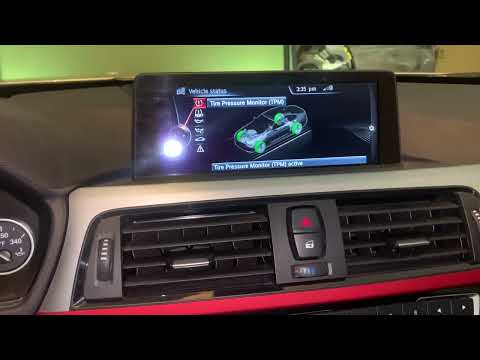
In this tutorial, you will see how to reset the tire light on a BMW 4 Series, a very simple and quick operation that should be done only after restoring the correct pressure in each tire. First, enter the cabin, then insert the key and turn on the instrument cluster. Next, access the general menu using the appropriate button on the center console, go to "My Vehicle", then "Vehicle Status", navigate to the tire section, and select "Tire Settings". At this point, just confirm the reset and restart the vehicle.
Updated on 16 October 2026 by ScegliAuto
Related tutorials
BMW Serie 4
(2013-2020 /
F33, F36, F32, MK 1)
In this tutorial, we can see how to reset the tire pressure warning light in the BMW 4 Series, an extremely simple and quick operation, to be done on…
BMW Serie 4
(2013-2020 /
F33, F36, F32, MK 1)
If the tire pressure warning light continues to appear on the dashboard display of your BMW 4 Series F32 (2014 model) despite no punctures, follow th…

BMW Serie 4
(2013-2020 /
F33, F36, F32, MK 1)
If you own a BMW Series 4 F33 and want to learn how to properly complete the manual reset of the engine oil light, all you have to do is read the fol…
Other guides you may be interested in
|
How to open the fuel flap of the Toyota Aygo?
The fuel flap of the Toyota Aygo can be opened by pulling the dedicated button located on the dashboard, on the left side of the steering column: this button should now be pulled upwards. This will unlock the mechanism that allows the flap to close, making it possible to open the fuel flap. You can then unscrew the cap underneath and refuel: after refuelling, reposition the cap and close the flap again. by ScegliAuto More videos
|
|
For advertising on this site Write to info@scegliauto.com
ScegliAuto is not responsible for any inaccuracy of the data in the lists. To report any inaccuracy or your business (if you own the business in question), please write to info@scegliauto.com
Number of seconds to generate the page: 0.255
(c) ScegliAuto 2026 - info@scegliauto.com - Privacy policy VAT number: IT01247470535 |
