
|
Do it yourself
| |||
| ||||


How do you reset the AdBlue warning light in the Dacia Dokker?
Model: Dacia Dokker
MK 1
- Years 2013-2024
The methodology used in this video guide is broadly similar to that applied in workshops, with the significant difference that in our case, an app on the phone is used, whereas workshops utilize larger and certainly more complex diagnostic tools. As soon as the aforementioned warning light is noticed, most likely due to the low level of additive in the tank, the product is topped up, then the previously mentioned app is opened, and after a brief configuration of the car model, active anomalies are searched for and reset. At this point, the procedure can be considered complete.
Posted on 6 December 2025 by ScegliAuto
Video tutorial
Related tutorials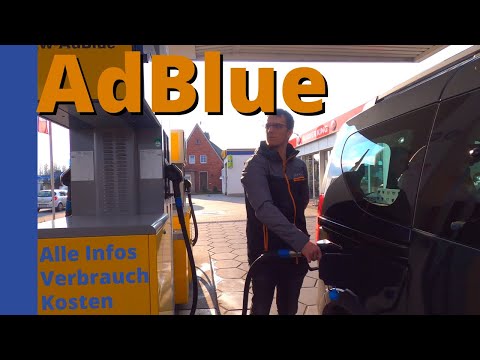
Dacia Dokker
(2013-2024 /
MK 1)
When the AdBlue warning light illuminates on the Dacia Dokker's instrument panel, it means that the level of additive liquid in the designated tank i…

Dacia Dokker
(2013-2024 /
MK 1)
In order to reset the AdBlue warning light on the Dacia Dokker, you must add the necessary amount of additional fluid to the tank: to top up, you mus…

Dacia Dokker
(2013-2024 /
MK 1)
To completely reset the Service light of the Dacia Dokker, it will be possible to insert the ignition key into the corresponding slot, turning it to …
Other guides you may be interested in
|
How to Open a Stuck Boot on the Peugeot 407?
On the Peugeot 407, the boot may become stuck, possibly due to a problem with the control button or the lock actuator. In such cases, you can perform an emergency opening by following the simple procedure shown in this tutorial. First, open the rear doors, then lower the seat back by operating the release lever. Next, go inside the boot, locate the lock, and manually operate it using a flathead screwdriver. The boot will then be free to open. by ScegliAuto More videos
|
|
For advertising on this site Write to info@scegliauto.com
ScegliAuto is not responsible for any inaccuracy of the data in the lists. To report any inaccuracy or your business (if you own the business in question), please write to info@scegliauto.com
Number of seconds to generate the page: 0.123
(c) ScegliAuto 2026 - info@scegliauto.com - Privacy policy VAT number: IT01247470535 |
