
|
Do it yourself
| |||
| ||||


How is the tire pressure reset in the Dacia Sandero Stepway?
Model: Dacia Sandero
B8
- Years 2012-2020
As correctly indicated in this video by the protagonist, the tire warning light alerts you to insufficient tire pressure. The correct value can be found on a sticker on the driver’s side door pillar, which should be kept in mind when inflating the aforementioned tires. Once this is done, the warning light must be reset as described below: with the instrument panel on, we access the Settings using the buttons on the right side of the steering wheel, select the Tire Pressure option, and finally press Ok. The procedure is complete, and the anomaly has been turned off.
Posted on 13 January 2026 by ScegliAuto
Video tutorial
Related tutorials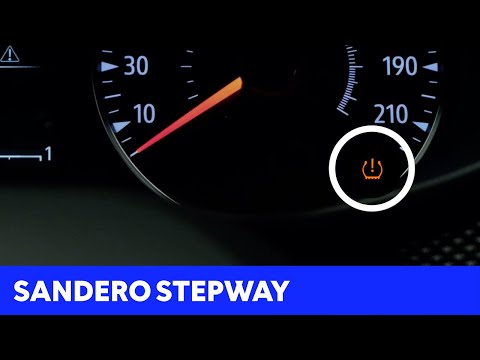
Dacia Sandero
(2021-2026 /
MK 3)
In today's video, you will see how to reset the tyre pressure light in a Dacia Sandero Stepway. This tutorial also applies to other models in the Rom…

Dacia Sandero
(2021-2026 /
MK 3)
The operation to reset the tyre pressure warning light on the Dacia Sandero Stepway is done by turning on the instrument panel and navigating through…

Dacia Sandero
(2021-2026 /
MK 3)
To reset the tire pressure warning light of the Dacia Sandero Stepway, you need to inflate the tires until they reach the recommended pressure value:…
Other guides you may be interested in
|
Where is the Spare Wheel in the Peugeot 5008?
This video shows where the spare wheel is located in the Peugeot 5008 and how to access it, useful in case of a puncture. As shown, the wheel is not in the usual boot compartment but underneath it, outside the vehicle. To free the wheel, first gather the tools provided, then open the boot, locate the small indicated hatch, and open it. Next, loosen the bolt just released using the large socket wrench enough to lower the wheel to the ground. by ScegliAuto More videos
|
|
For advertising on this site Write to info@scegliauto.com
ScegliAuto is not responsible for any inaccuracy of the data in the lists. To report any inaccuracy or your business (if you own the business in question), please write to info@scegliauto.com
Number of seconds to generate the page: 0.723
(c) ScegliAuto 2026 - info@scegliauto.com - Privacy policy VAT number: IT01247470535 |
