
|
Do it yourself
| |||
| ||||


Unlock Code for Medianav Dacia, Renault
Model: Dacia Dacia Various
In this video tutorial, you will learn how to enter the unlock code for the Medianav car radio found in Renault and Dacia models. This unlock code is usually found in the maintenance booklet of your vehicle. If this is not the case or if you do not have the booklet, follow the steps below to retrieve it. Download the Renault radio code app from the app store or play store, and by removing the navigator, you will find the label where the barcode is marked: take the last four numbers and enter them into the app, which will then provide the unlock code for the car radio: now enter it!
Updated on 20 March 2026 by ScegliAuto
Video tutorial
Related tutorials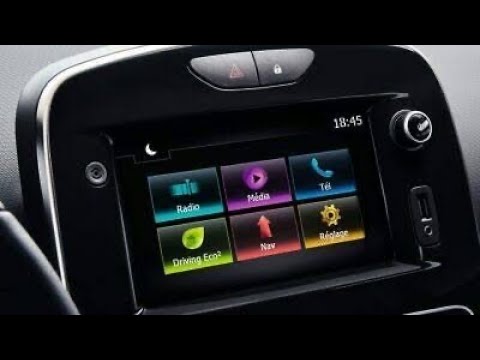
Dacia Dacia Various
In this video tutorial, you will learn how to remove the Medianav multimedia system from Renault and Dacia models. First, remove the plastic trim sur…

Dacia Dacia Various
Insert a USB stick into the Medianav, go to the navigation options and click on update. Obtain a PC and visit the Medianav map update website: go to …

Dacia Dacia Various
In order to reset the MediaNav of Dacia vehicles, you need to connect a computer to the OBD port of the vehicle: once this device is connected, you n…
Other guides you may be interested in |
Frequently Asked QuestionsHow to Open the Bonnet on the Lancia Y
To open the bonnet on this vehicle, follow these simple instructions: first, open the driver's door and locate the lever positioned just below the dashboard, marked with an image of the vehicle with the bonnet open. Pull this lever towards you until you hear a "click" indicating the bonnet is released. Next, exit the cabin and stand in front of the bonnet to disengage the safety catch and complete the opening. To do this, slightly lift the bonnet, locate the yellow lever underneath, and pull it to the left to fully release and open the bonnet. by ScegliAuto More videos
|
|
For advertising on this site Write to info@scegliauto.com
ScegliAuto is not responsible for any inaccuracy of the data in the lists. To report any inaccuracy or your business (if you own the business in question), please write to info@scegliauto.com
Number of seconds to generate the page: 0.139
(c) ScegliAuto 2026 - info@scegliauto.com - Privacy policy VAT number: IT01247470535 |
