
|
Do it yourself
| |||
| ||||


How to Reset the AdBlue Warning Light in the Ford Transit Custom?
Model: Ford Transit
MK 8
- Years:
2014, 2015, 2016, 2017, 2018, 2019, 2020, 2021, 2022, 2023, 2024
Video tutorial
The video available here shows how to reset the warning light in the Ford Tourneo, but this method is also valid for the Ford Transit Custom. The anti-pollution additive used in diesel engines, also known as AdBlue, activates the warning light on the dashboard when it runs low in the tank. After refuelling, if it does not turn off automatically, you can visit a workshop where they will connect a PC to the vehicle's OBD port and interface with the ECU using specific software, then select the vehicle, make, model, and engine type, and finally perform the reset.
Updated on 7 October 2026 by ScegliAuto
Related tutorials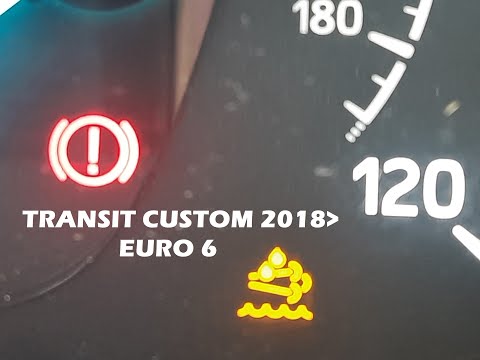
Ford Transit
(2014-2024 /
MK 8)
In this video, we will see how to reset the AdBlue warning light on the Ford Transit Custom: The warning appears stating that in a considerable numbe…

Ford Transit
(2014-2024 /
MK 8)
To reset the AdBlue warning light on the Ford Transit Custom, you need to top up with the necessary amount of additive liquid: to do this, open the f…

Ford Transit
(2012-2024 /
Custom)
We will briefly see how to refill AdBlue on a Ford Transit Custom in simple and quick steps. First, obtain the appropriate AdBlue container, or refil…
Other guides you may be interested in
|
How to reset the tyre pressure warning light on the Suzuki Vitara?
To reset the tyre pressure warning light on the Suzuki Vitara, turn on the ignition and navigate through the menu displayed on the instrument cluster: here you will find the option related to tyre pressure, indicating which wheel has insufficient pressure. Inflate that tyre to the recommended pressure value, which is listed on the sticker attached to the driver's door pillar: once the tyres are inflated, you will notice that the warning light will completely disappear from the display. by ScegliAuto More videos
|
|
For advertising on this site Write to info@scegliauto.com
ScegliAuto is not responsible for any inaccuracy of the data in the lists. To report any inaccuracy or your business (if you own the business in question), please write to info@scegliauto.com
Number of seconds to generate the page: 0.031
(c) ScegliAuto 2026 - info@scegliauto.com - Privacy policy VAT number: IT01247470535 |
